
Amazon Ungating
Amazon Ungating Invoice Requirements (2026): What Passes
%2520What%2520Passes-1200x627.png&w=3840&q=75)
There is a strange moment that every wholesale seller encounters at some point. You're holding a sealed, genuine product with the distributor's invoice sitting in your inbox and Amazon has just told you the document "could not be verified." You know the product is real. The invoice is genuine. But the rejection? That's all too real.
What changed is who's reading your invoice. In 2026, most ungating applications get screened by software before a human ever sees them, and that software doesn't judge whether your product is authentic. It checks dates, formats, and matching fields, and a genuine invoice that misses one check gets treated exactly like a fake one. This guide covers what a passing invoice looks like, what gets denied on sight, and how to escalate when a good invoice gets rejected anyway. It's part of our full guide on How to Get Ungated on Amazon in 2026
Valid and Passing Are Different Things: How Amazon's Automated Review Works
This is the mental shift that fixes most rejection loops. Sellers think of their invoice as valid or fake. Amazon's first review doesn't think that way at all.
Most ungating applications now go through an automated first pass. The system checks whether your invoice matches a set of rules before any human ever sees it. Is the date inside the window? Does the business name on the invoice match your Seller Central account exactly? Is there a supplier phone number and address? Are there enough units?
Fail one rule and the application dies right there, even if the invoice came straight from the manufacturer. Sellers on the Amazon forums report exactly this: invoices from the actual brand, rejected within minutes, clearly without human review.
There's a documented reason the screws keep tightening. In its Trustworthy Shopping Experience Report, published in April 2026, Amazon says it seized and disposed of more than 15 million counterfeit products in 2025 alone, and that its Counterfeit Crimes Unit has pursued over 32,000 bad actors across 14 countries since 2020. Your invoice isn't being reviewed in a vacuum. It's being fed into a machine built to catch that volume of fraud, and the machine defaults to “no”.
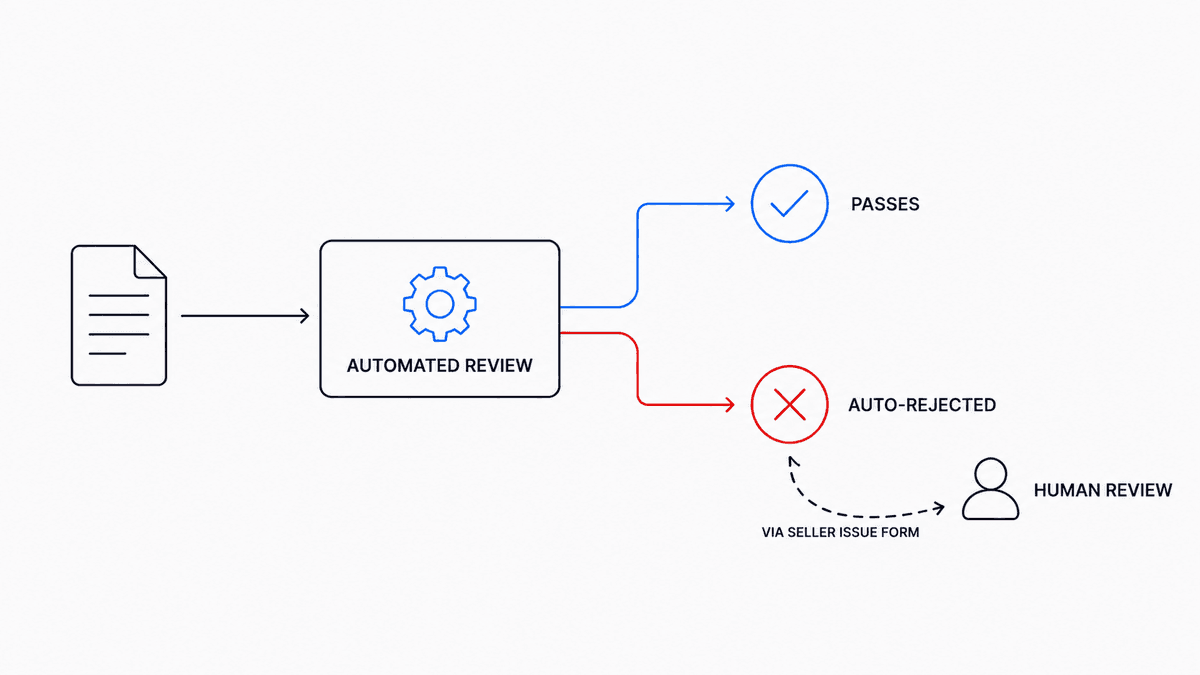
So, the goal is not to prove your product is real. The goal is to hand the system a document it can verify on every single check. That's a formatting and detail game, and once you play it that way, approval rates change fast.
What a Passing Ungating Invoice Needs in 2026: The 7-Point Spec
Here's what the automated review is looking for, piece by piece. Cross-check everyone before you submit, because one miss sinks the whole application.
- A Commercial Invoice from a Real Wholesale Source
Amazon wants a commercial invoice from a distributor or the brand itself. Retail receipts don't work, even for genuine product, because a store receipt proves you bought something but says nothing about whether you're allowed to resell it. Marketplace order confirmations and liquidation site invoices fail for the same reason. If you're not sure your document even counts as a proper wholesale invoice, the test is simple: it should be issued by the supplier's business, itemized, and show a completed purchase, not a checkout receipt.
- Dated Within the Window (180 Days, 90 for Some Categories)
For most ungating applications, the safe number is 180 days from the date Amazon reviews it, and some categories look for 90. If your last order from that supplier was seven months ago, don't bother submitting it. Place a fresh order and use the new invoice. And don't sit on a good invoice either. Sellers sometimes wait weeks to apply and let a perfectly usable invoice age out.
- At Least 10 Units, Itemized
This is a requirement that stays pretty consistent across different categories and brands. You need to provide ten units of the product or brand you’re applying for, and they should be listed out clearly. No vague line items allowed. Just a single unit or even a sample order of three will get rejected, regardless of how polished the rest of your document looks.
- Business Name and Address Matching Seller Central Exactly
This one kill more legitimate applications than anything else. Exactly means exactly. If Seller Central says "Ridgeline Trading LLC" and the invoice says "Ridgeline Trading," that mismatch can fail the automated check. Suite numbers, abbreviations, an old address you never updated after moving. All of it matters. Before you order from a new supplier, send them your business name and address exactly as they appear in your account and ask them to put it on the invoice character for character.
- The Supplier's Full, Verifiable Details
Business name, physical address, phone number, and website. Amazon verifies these, and forum moderators have confirmed reviewers do check whether the supplier is real and reachable. An invoice from a supplier with no working phone line or a website that went up last month raises flags you can't talk your way past.
- Identifiable Products (UPC, Model Number, ASIN)
Each line item should carry a model number or UPC, and adding the ASIN helps the reviewer connect your invoice to your application. Amazon has said handwriting the ASIN on the invoice is acceptable, so do it. Anything that saves the reviewer from guessing works in your favor.
- Finalized and Paid, not a Quote or Pro Forma
Quotes, pro forma invoices, and order confirmations all fail. Amazon wants proof that money moved and product shipped, so the document should read as paid or fulfilled, not pending.
That's the whole spec for the document itself. One thing sits outside it: your account. Amazon's approval process also weighs account health, with documented targets of an order defect rate under 1%, a late shipment rate under 4%, and a pre-fulfillment cancellation rate under 1.75%. A flawless invoice attached to a struggling account can still lose. Fix the account first if those numbers are off.
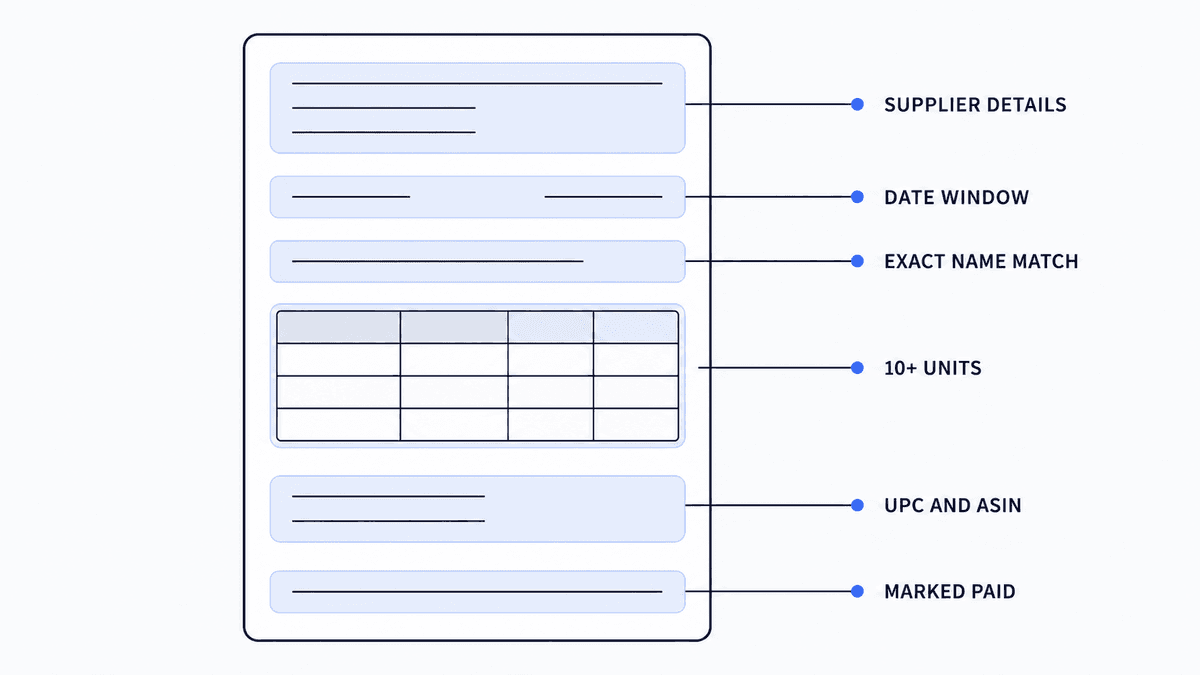
Notice that none of this is about whether your product is authentic. It's all about whether a system, and then maybe a person, can verify every claim in one pass.
What Gets Rejected Automatically
Knowing the failure patterns saves you from burning applications. These are the ones that come up constantly:
Retail receipts, including receipts from Amazon itself. Invoices older than the window. A business name that's close but not exact. Invoices with no supplier phone or website. PDF invoices that look edited, because compression artifacts and mismatched fonts get flagged even when the edit was innocent, like your supplier adding the ASIN digitally after the fact. Ask them to reissue the invoice instead of editing it. And invoices from liquidation or clearance sources, which fail on the authorization question no matter how detailed they are.
Then there's the rejection that isn't about your invoice at all. More brands now maintain whitelists of approved sellers, and if you're not on the brand's list, no invoice can overcome that. The distributor sold you the product legitimately, but a distributor can only sell. It can't authorize you. How close your supply sits to the brand, and why that decides whether your paperwork holds up, is covered in our guide on Brand Authorization Tiers. The short version: if you've submitted a flawless invoice for the same brand three times and hit the same wall, you're not facing an invoice problem. You're facing a brand decision, and the fix is brand approval or a different product, not a fourth submission.
Category-Specific Requirements: Grocery, Beauty, and Toys
The core invoice spec holds everywhere, but some categories stack extra requirements on top of it. Grocery applications often ask about expiration dating and storage. Beauty can require ingredient documentation or safety certificates for certain product types. Toys frequently need compliance certificates, especially heading into Q4 when review queues get slow and strict at the same time.
The invoice gets you to the table. The category paperwork gets you through the door. Check the exact requirements listed in Seller Central for your category before you order, because the invoice alone won't be enough there.
Pre-Submission Check: Read Your Invoice Like the Reviewer
Five minutes here saves weeks of resubmission. Pull up your invoice and your Seller Central account side by side and go through it as if you'd never seen either before.
Can you verify the supplier from the invoice alone? Does their phone number ring? Does the business name match your account down to the punctuation? Can you count 10 or more units of the exact product? Is the date comfortably inside 180 days?
One trick experienced sellers use: annotate the invoice before uploading. Mark the supplier's details, mark your own business name, point to the units. It feels like overkill, but if the application reaches a human, you've just made a tired reviewer's job easy, and easy applications get approved. Confusing ones get declined.
Compliant Invoice Still Rejected? Use the Seller Issue Form
It happens, and in 2026 it happens more than it used to. Two things matter here.
First, do not keep resubmitting the same application. Amazon moderators have said that repeatedly reapplying for the same brand through new cases can trigger automatic rejections on its own. You're teaching the system to say no to you.
Second, use the escalation path most sellers don't know exists. If your invoice genuinely meets every requirement and keeps getting denied, submit a Seller Issue Form through Seller Central. Done properly, this moves your case out of the automated queue and in front of a real person who can actually judge whether your invoice is legitimate. Sellers regularly report approvals through this route for applications that automation had blocked for months. It's slower than the standard flow, but slow and approved beats instant and denied.
If human review still says no, take the hint. The invoice was never the problem. Redirect that inventory budget to a brand that will approve you.
Passing Invoices Start With Where You Buy
Here's the pattern under everything above. Sellers with chronic invoice problems almost never have a paperwork problem. They have a sourcing problem. The invoice is just where it shows up.
Buy from a verified US distributor with a real address, a working phone line, and clean documentation, and passing invoices are simply what you get. Buy from a source you found in a Telegram group, and no amount of formatting will save the application.
That's the thinking behind how we built B2B Supplier Hub. You can search millions of wholesale products free and see the actual numbers, cost, stock, and retail price, from human-verified distributors in our network before you spend anything. When you reveal a supplier, you're connecting with a business that's been checked by people, not scraped off a list. No supplier can guarantee your ungating application, but sourcing from verified distributors is where a passing invoice begins.
The requirements in this guide aren't going to loosen. Amazon's review has gotten more automated and stricter every year, and 2026 is the tightest it's been. But that cuts both ways. The sellers who treat the invoice as a spec to meet, instead of a formality to rush, are clearing gates their competitors keep bouncing off. Now you know the spec.
Frequently asked questions
01Can I use a retail receipt to get ungated on Amazon?
02How many units do I need on an ungating invoice?
03How old can an ungating invoice be?
04Does the invoice need the ASIN on it?
05Why does Amazon reject invoices from authorized distributors?
The B2B SupplierHub Team
Wholesale & sourcing
Stop hunting suppliers by hand. Type a UPC instead.
B2B Supplier Hub shows the suppliers in our network carrying a product on one page: wholesale cost, stock, and retail price side by side. Free to search, no card required.