
Amazon Ungating
How to Get Ungated on Amazon in 2026 (Category & Brand Ungating)
-1200x627.png&w=3840&q=75)
You found the product. The margin works, the supplier has stock, and the listing sells thirty units a day. Then you go to list it, and Amazon shows you the message every wholesale seller learns to dread: "You need approval to sell this product."
That's a gate, and for new sellers it feels like a wall. It isn't. Gating is a checkpoint, not a ban. Amazon is asking you to prove your inventory comes from a legitimate supply chain before it lets you in. Sellers who understand what Amazon is actually checking get approved routinely, often within days. This guide covers the whole process: what gating is, how to check where you stand, the documents that pass, and what to do when an application bounces.
What "Gated" Actually Means (Category vs. Brand vs. Product Gating)
Getting ungated on Amazon means receiving Amazon's approval to sell in a restricted category, brand, or product that your account can't currently list. Amazon restricts these areas to protect customers from counterfeits and unsafe goods, and it grants access to sellers who can document a legitimate source of inventory, usually through recent invoices from a wholesale distributor.
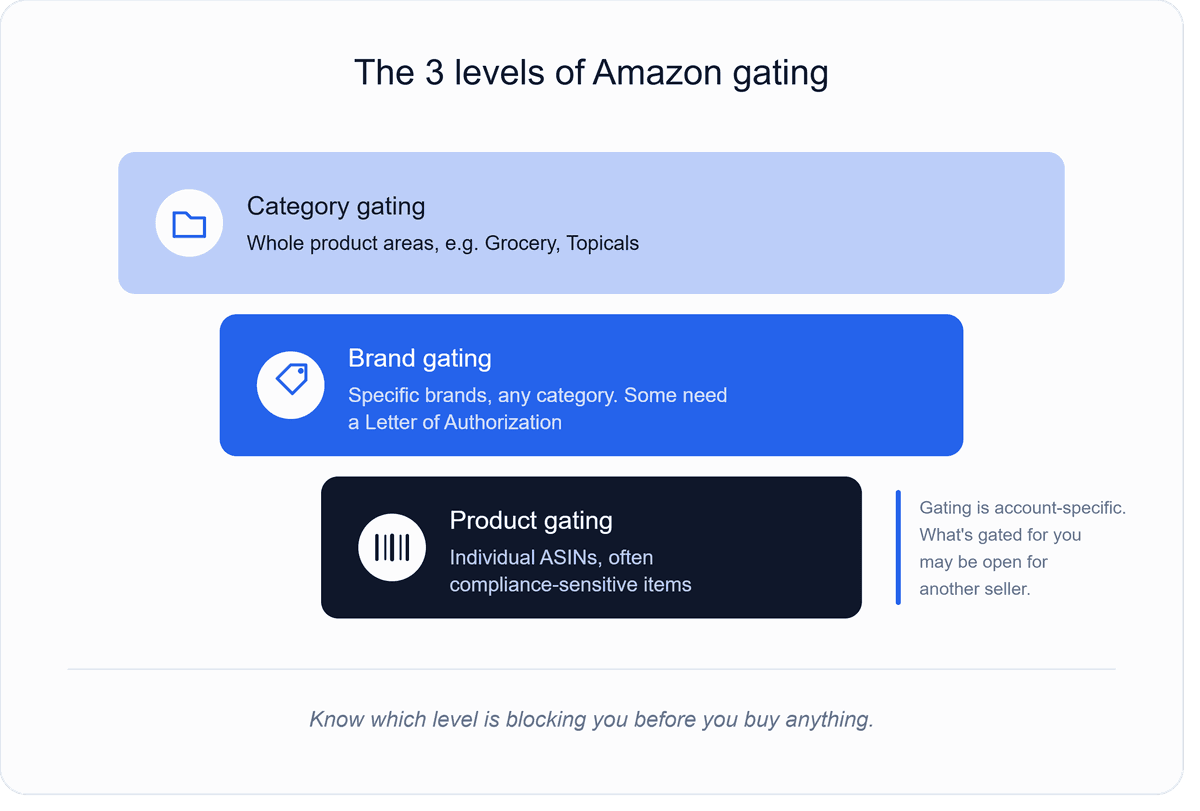
The word "ungating" gets used loosely, but there are three distinct levels, and knowing which one is blocking you changes what you do about it.
Category gating restricts an entire product area. Grocery & Gourmet Food, topical products, and certain collectible categories commonly require approval before you can list anything in them at all.
Brand gating restricts specific brands regardless of category. Many major brands are gated for most or all third-party sellers, and some brands can't be unlocked with invoices at all. They require authorization from the brand itself or simply aren't open to new sellers.
Product-level gating restricts individual ASINs, sometimes inside categories you're otherwise approved for. This often shows up around compliance-sensitive items.
One more thing that confuses new sellers: gating is account-specific. A product that's gated for you may be open for a seller with an older account and stronger sales history, because Amazon weighs account age, performance, and history when deciding both what's gated and what gets auto-approved. That's why "is X gated?" has no universal answer. The only answer that matters is what your account sees.
Step 1: Check Whether You're Actually Gated — and for What
Before buying anything or preparing any documents, confirm the restriction from inside your own account, because that's the only view that's accurate for you.
In Seller Central, go to Add a Product and search for the exact item by ASIN, UPC, or name. If the product is restricted for your account, you'll see a "Show limitations" or "Apply to sell" link instead of a normal listing option. Click it. Two things can happen, and both are useful.
Sometimes Amazon approves you instantly, with no documents requested. Auto-approval is common for established accounts with clean metrics, and plenty of sellers discover they were never really gated at all; they just never clicked apply. It costs nothing to try, so this should always be your first move.
If instead Amazon presents requirements, read them carefully and screenshot them. This screen tells you exactly what this application needs — typically invoices, sometimes a letter of authorization from the brand, and occasionally both. Everything you buy and submit from here should be aimed at that specific list, not at a generic checklist from a forum post, because requirements differ by category, brand, and account.
While you're there, note what Amazon is not asking for. If the requirement is invoices, you don't need an authorization letter, and chasing one wastes weeks. If the requirement is a letter of authorization, no stack of invoices will substitute for it.
Step 2: Understand the Invoice Standard Before You Buy Anything
Most ungating applications live or die by one document: the invoice. And most denials happen because sellers buy first and read the requirements second.
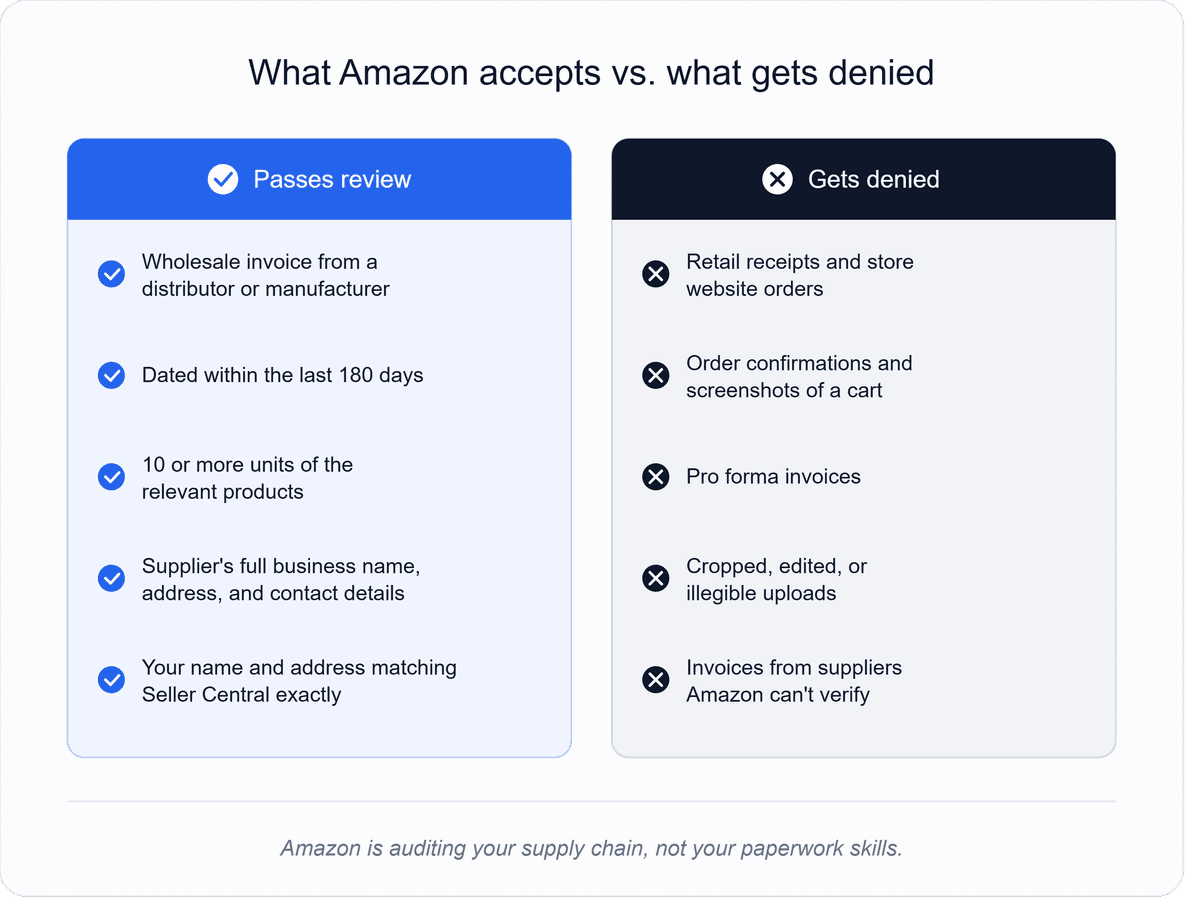
The commonly required standard looks like this. Amazon typically asks for at least one invoice from a wholesale supplier (a distributor or the manufacturer) dated within the last 180 days, showing a purchase of at least 10 units of the relevant products.
The invoice needs to show the supplier's real business name, address, and contact details and your name and address exactly as they appear in your Seller Central account. Amazon may contact the supplier to verify the purchase, which is a core reason the supplier has to be a genuine wholesale business rather than a retail source.
That last point eliminates the most common mistake in ungating: retail receipts don't work. Receipts from retail stores or their websites are not wholesale invoices, and neither are order confirmations, pro forma invoices, or screenshots of a cart.
Amazon is checking your supply chain, and a retail purchase proves the opposite of what it wants to see. For brand ungating, some applications also request a letter of authorization: a document from the brand or its authorized distributor confirming you're permitted to resell.
Whether you need one is stated on the application screen from Step 1, and if you do, it has to come from the brand's actual distribution chain, which is one more reason the supplier you choose matters more than any other decision in this process.
Step 3: Buy Your Ungating Units From a Distributor That Will Pass Verification
Here's the part most ungating guides skip: the application is really an audit of your suppliers. You can follow every formatting rule perfectly, and if the invoice comes from a company Amazon can't verify as a legitimate wholesale distributor, the application fails anyway.
That means your ungating purchase is a small wholesale order like any other, and it goes better when you approach it that way. You need a distributor that actually carries the brand or category you're unlocking, will sell you a small opening order of 10 or more units, and issues proper invoices with their full business details.
Legitimate distributors do this as a matter of course; invoicing correctly is just how wholesale works. Sources that can't produce a proper invoice, or that offer "invoices" for purchases that never happened, are the fastest route to a denied application and a damaged account.
Amazon treats fabricated documentation as a serious violation, and no gated category is worth that risk. Read our guide on how to find the authorized distributor of a brand.
Getting that opening order also means getting approved by the distributor first — most have their own application process before they'll sell to you. What they check and how to clear it is its own topic, covered in our guide to what distributors look for before approving an Amazon seller.
The short version: distributors approve sellers who look like real businesses, with a resale certificate, straight answers, and realistic opening orders. The 10-unit ungating buy is exactly the kind of small first order most distributors are happy to start a relationship with.
One practical note on quantity: buy the required units of the actual products you intend to sell in the actual category or brand you're unlocking. An invoice for unrelated products doesn't demonstrate a supply chain for the thing you're applying to sell.
Step 4: Submit the Application Properly
With the invoice in hand, the submission itself is straightforward, and precision is what keeps it that way.
Return to the same application screen from Step 1 and upload the invoice as a clear, complete document: a clean PDF or a sharp photo showing the entire page. Don't crop out totals, don't annotate over the supplier's details, and don't edit the document in any way.
If Amazon asks for supporting details, the information you enter should match the invoice and your Seller Central account exactly: the same business name and the same address, character for character. Mismatched details are one of the most common and most avoidable denial reasons, because Amazon's review can't reconcile a document addressed to one name with an account registered under another.
Then wait. Straightforward applications are often reviewed within a few business days, though timelines vary with category and volume. Resist the urge to submit duplicate applications while one is pending; it doesn't speed anything up.
If the approval lands, you're in, and it generally stays that way: ungating doesn't expire, though Amazon can change restriction policies over time. List the units from your ungating order, and you've recovered part of the cost of the process on day one, which is why buying products you actually intend to sell (Step 3) matters. Done right, ungating isn't an expense; it's your first profitable order in a new category.
If You're Denied: Diagnose, Fix, Reapply
A denial is information, not a verdict. Amazon lets you reapply, and most denials trace back to a small set of causes you can actually fix.
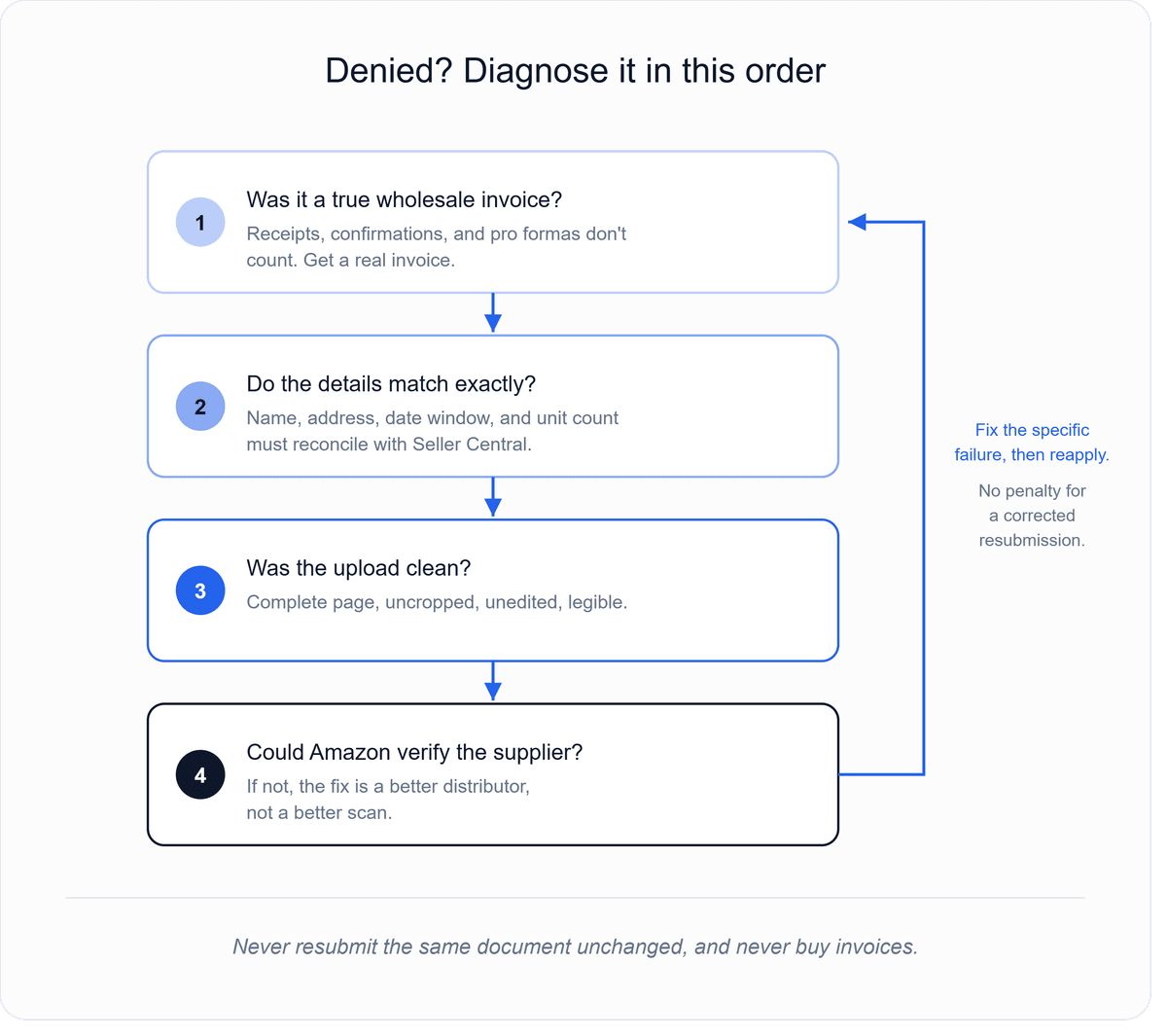
Work through them in order.
First, the document itself: was it a true wholesale invoice or something adjacent, a receipt, an order confirmation, or a pro forma?
Second, the details: Does the name and address on the invoice match your Seller Central account exactly, and is the invoice dated inside the required window with the required units?
Third, the image quality: was the upload complete, uncropped, and legible?
Fourth, and this is the one sellers least want to hear, the supplier: if everything else was clean, Amazon may not have been able to verify the distributor as a legitimate wholesale source. If that's the diagnosis, the fix isn't a better scan; it's a better supplier and a fresh invoice from one.
Fix the specific failure, then reapply through the same flow. There's no penalty for a corrected resubmission, and sellers regularly pass on the second attempt once the actual problem is addressed.
What you shouldn't do is resubmit the same rejected document unchanged or escalate to shortcuts: purchased invoices, edited documents, or third-party "guaranteed ungating" schemes that rely on either. Those trade a denied application for an account-level problem, which is a catastrophically bad exchange.
Category and Brand Notes Worth Knowing Before You Start
A few patterns help you set expectations by category.
Grocery, topicals, and beauty are among the most commonly gated categories and are generally invoice-driven; the standard process in this guide is the path. Expiration-dated and body-contact products get extra scrutiny for obvious reasons, so supplier legitimacy matters even more here.
Toys tighten seasonally. Amazon has historically applied holiday selling requirements to the Toys & Games category for Q4, which is why experienced sellers ungate and establish sales history well before the fourth quarter rather than during it. If Q4 toys are in your plan, the time to run this process is months ahead, not in November.
Brands are the least predictable level. Some ungate with the standard invoice process, some require a letter of authorization, and some are effectively closed to new third-party sellers no matter what you submit. Before spending money on inventory for a brand application, confirm from the Step 1 screen what the application actually accepts. If it's an authorization letter, that conversation starts with the brand's distribution chain, not with more invoices.
Across it all, one principle holds: the sellers who get ungated smoothly are the ones whose supply chain was real before they applied. The application just proves it.
Get the Invoice Right by Getting the Distributor Right
Every step of ungating gets easier when it starts from a distributor Amazon can verify, and finding one that actually carries your target brand is usually the slowest part of the whole process. B2B Supplier Hub removes that search: enter the UPC or brand you're trying to unlock and see every verified distributor in the network carrying it, with exact wholesale cost and live stock, free.
When one of them fits your ungating order, reveal it, get approved, and buy the 10 units that open the category from a supplier whose invoice will hold up. Search the brand you want to unlock, and start from the numbers.
Frequently asked questions
01How much does it cost to get ungated on Amazon?
02How long does Amazon ungating take?
03Can you get ungated without invoices?
04Why was my ungating application denied?
05Does ungating expire?
The B2B SupplierHub Team
Wholesale & sourcing
Stop hunting suppliers by hand. Type a UPC instead.
B2B Supplier Hub shows the suppliers in our network carrying a product on one page: wholesale cost, stock, and retail price side by side. Free to search, no card required.