
Blog
7 Best Wholesale Sourcing Tools for Amazon Sellers (2026)
-1200x627.png&w=3840&q=75)
Wholesale sourcing has a software problem, and it is not a shortage of tools. It is that "sourcing tool" means five different things, and most comparison lists lump them together as if they were interchangeable. A supplier directory, a price list scanner, and a brand research database solve completely different problems, and buying the wrong one for your workflow wastes months.
This guide is for wholesale resellers who sell on Amazon and want to know which tool actually fits the job in front of them. We cover seven tools across the full sourcing workflow: finding suppliers, researching brands, and scanning price lists. For each one you get current 2026 pricing, what it genuinely does well, and where it falls short.
One disclosure up front: B2B Supplier Hub is our platform, and it appears on this list. We have placed it where we honestly believe it ranks for its specific job, and we have been just as direct about what it does not do as we are about every other tool here.
Quick Comparison
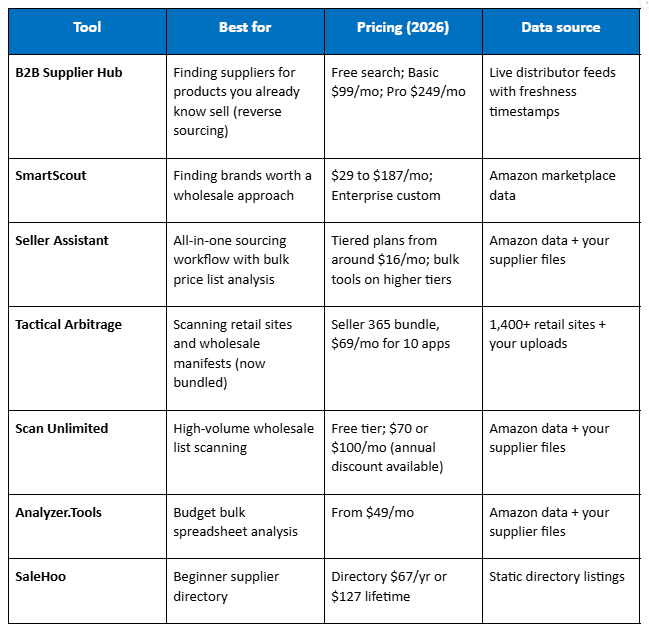
Prices checked August 2026. Vendors change pricing often, so confirm on their sites before buying.
1. B2B Supplier Hub: Best for Finding Suppliers for Products That Already Sell
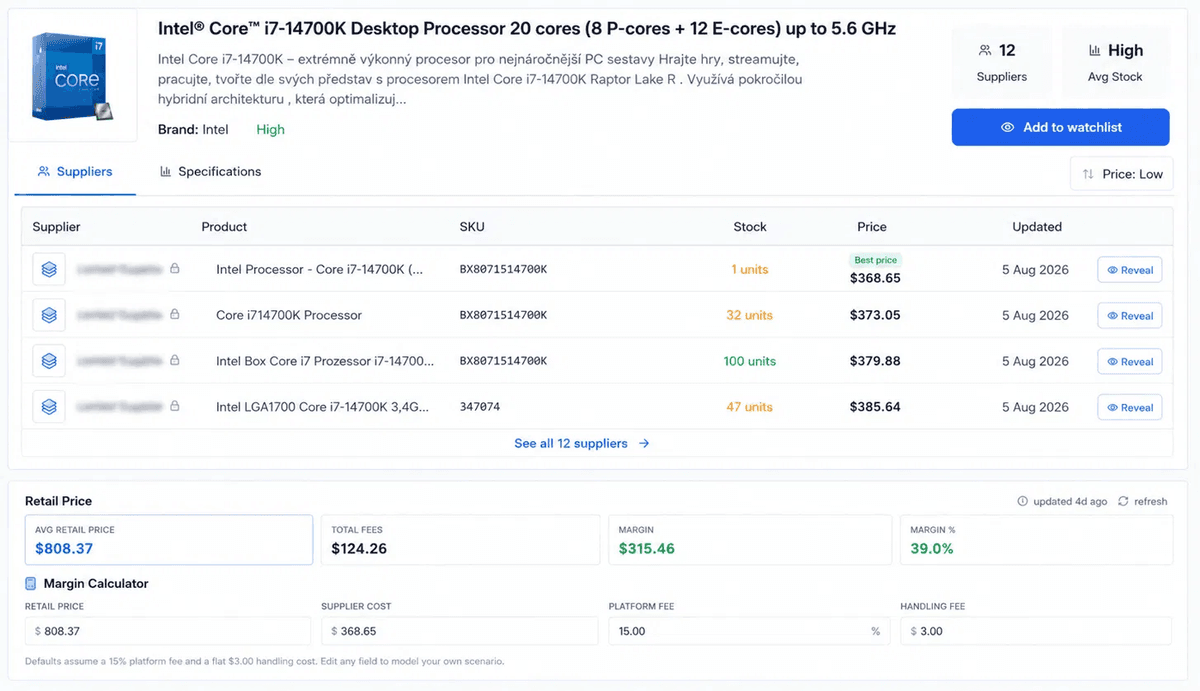
Every other tool on this list assumes you start with a supplier and work forward: get a catalog, scan it, find the profitable products inside. B2B Supplier Hub works in the opposite direction. You start with a product you already know sells, search it by UPC, name, or MPN, and see which distributors in the network carry it, at what exact cost, with what real stock, next to the current retail price.
That workflow is called reverse sourcing, and if you have ever had a proven winner and spent weeks of calls and emails hunting for a second supplier, you already know why it matters. We wrote a full walkthrough of the workflow in our reverse sourcing guide
The pricing model is the inverse of a directory. Search is free and every number is visible to everyone: exact wholesale cost, real stock, retail price, all with a freshness timestamp. You pay only to connect, using reveal credits to open a direct line to a supplier when the numbers already make sense. A revealed supplier is yours permanently, kept even if you cancel, and there is zero commission on anything you buy from them. If a revealed supplier's feed goes stale or they leave the platform within 60 days, the credit refunds automatically.
Strengths
- Reverse sourcing as the core workflow. A few scanners offer a "reverse lookup" that searches retail websites for price gaps; this searches wholesale distributor feeds for actual supply. Different data, different job.
- Bulk UPC search on paid plans: check a whole list of proven winners for suppliers in one pass instead of one product at a time.
- You see every number before spending anything, so a reveal is a certainty purchase, not a gamble on a name.
- Revealed suppliers are permanent, and Basic and Pro reveals include the supplier's full live catalog, not just contact details.
- A Chrome extension puts supplier count, lowest wholesale cost, and stock on the Amazon product page while you browse (included with paid plans).
- Millions of wholesale products searchable free, from a growing network of human-verified US distributors.
Weaknesses
- It is a supplier discovery platform, not a price list profitability analyzer. Bulk UPC search finds suppliers for a list of products, but if your workflow is calculating fees, ROI, and margin across a supplier's 5,000-row price file, pair it with a scanner from this list rather than replacing one.
- The network is growing, not universal, and coverage today centers on Electronics, Sports & Outdoors, and Tools & Home Improvement, with more categories on the way. If no distributor in the network carries your product, you will see that honestly rather than getting padded results.
- Finding a supplier does not guarantee approval. Authorization gates are real in wholesale, and no tool removes them.
Pricing: Free (unlimited search with full numbers, 10 watchlist items, one-off supplier reveal at $99 for name and direct contacts, credited toward Basic if you upgrade within 30 days). Basic $99/mo with 2 reveals monthly, each including the supplier's full live catalog. Pro $249/mo with 6 reveals and priority support. Extra reveals $75. Start free, no card required.
2. SmartScout: Best for Finding Brands Worth a Wholesale Approach
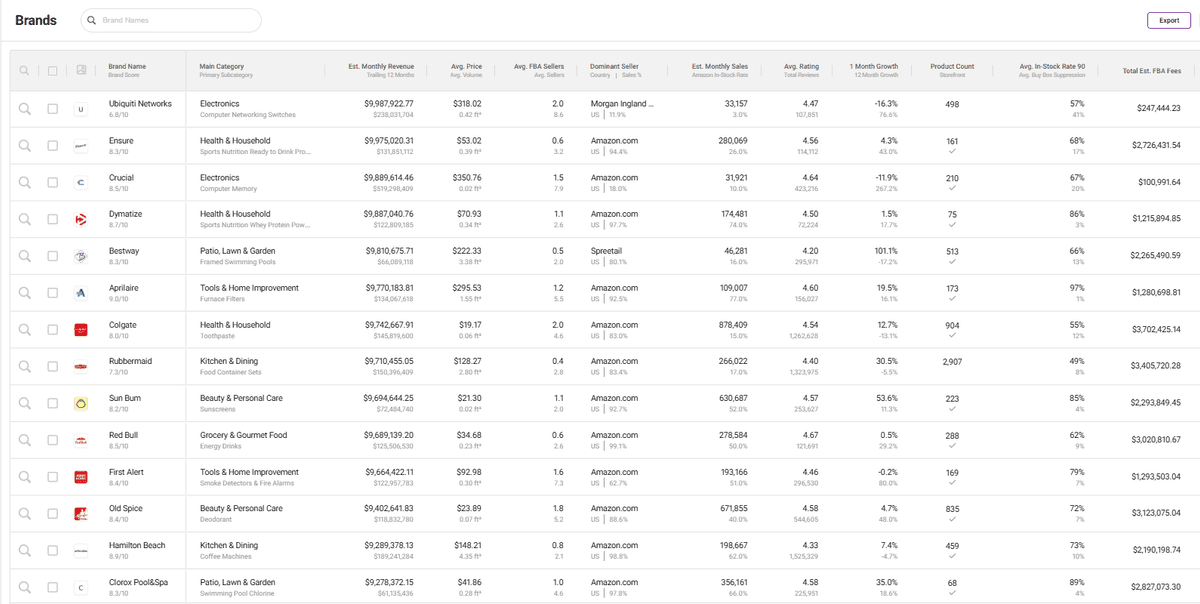
SmartScout attacks a different stage of the workflow: before you have a product at all. Its core asset is a database tracking over 1.5 million brands on Amazon, filterable by estimated revenue, number of FBA sellers, Amazon's own in-stock rate, and listing quality. The play is to find brands with real sales, thin competition, and weak listings, then approach the brand or its distributors for an account.
Strengths
- The strongest brand-level research tool in the wholesale space, and widely respected among serious wholesale sellers.
- Filters map directly to how experienced buyers actually evaluate opportunities: seller count, Amazon presence, revenue distribution.
- Low entry price for what it does, and useful well beyond sourcing (competitor and category analysis).
Weaknesses
- It tells you which brands look attractive, not who supplies them or at what cost. The outreach, verification, and pricing discovery are still entirely on you.
- The volume of tools and data has a real learning curve, and new sellers can drown in it.
- No free trial; there is a 7-day money-back guarantee instead.
Pricing: Basic $29/mo, Essentials $97/mo, Business $187/mo, Enterprise custom. Annual billing discounts apply.
3. Seller Assistant: Best for an All-in-One Amazon Sourcing Workflow
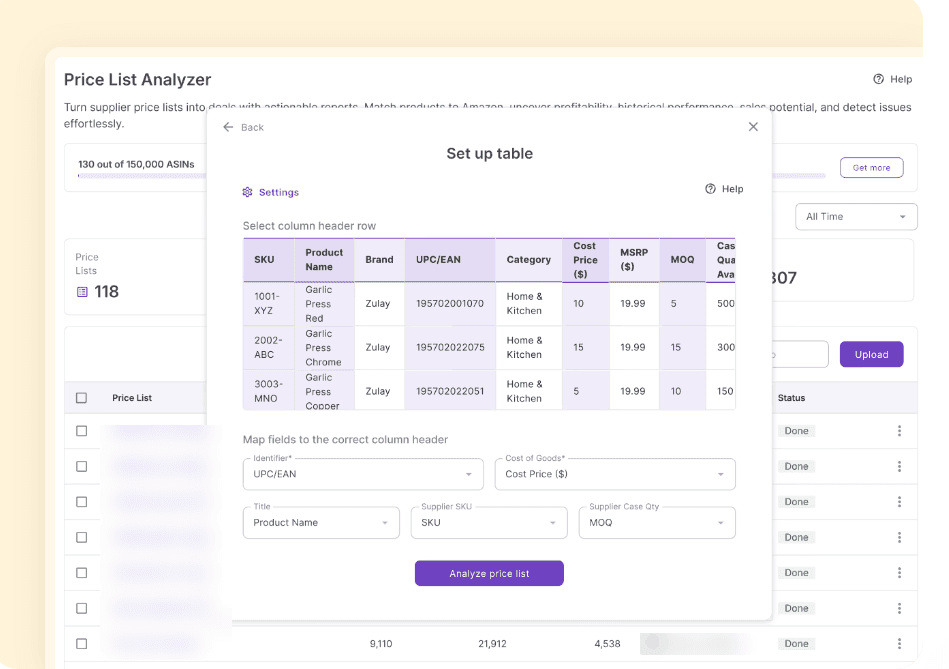
Seller Assistant has grown from a browser extension into a full workflow platform for Amazon wholesale: a Price List Analyzer for bulk supplier files, a bulk restriction checker, brand analysis, IP-complaint alerts, and purchase order management, plus the extension for on-page product checks.
Strengths
- The most complete workflow coverage on this list. Analysis, restriction checks, and PO creation live in one system.
- The bulk restriction checker is genuinely valuable for Amazon sellers; eligibility problems surface before you buy, not after.
- Accessible entry pricing, with a 14-day free trial on paid plans.
Weaknesses
- The bulk tools that matter most for wholesale (Price List Analyzer, Brand Analyzer) sit on the higher tiers, so the real cost for a wholesale operation is above the headline entry price.
- It analyzes the supplier lists you already have. It does not find you suppliers, so it solves the second half of sourcing, not the first.
- Amazon-centric by design; less useful if you are diversifying channels.
Pricing: Tiered plans starting around $16/mo billed monthly, with bulk analysis tools on upper tiers. Check current tier limits before choosing; they change.
4. Tactical Arbitrage: The Legacy Scanner, Now Sold in a Bundle
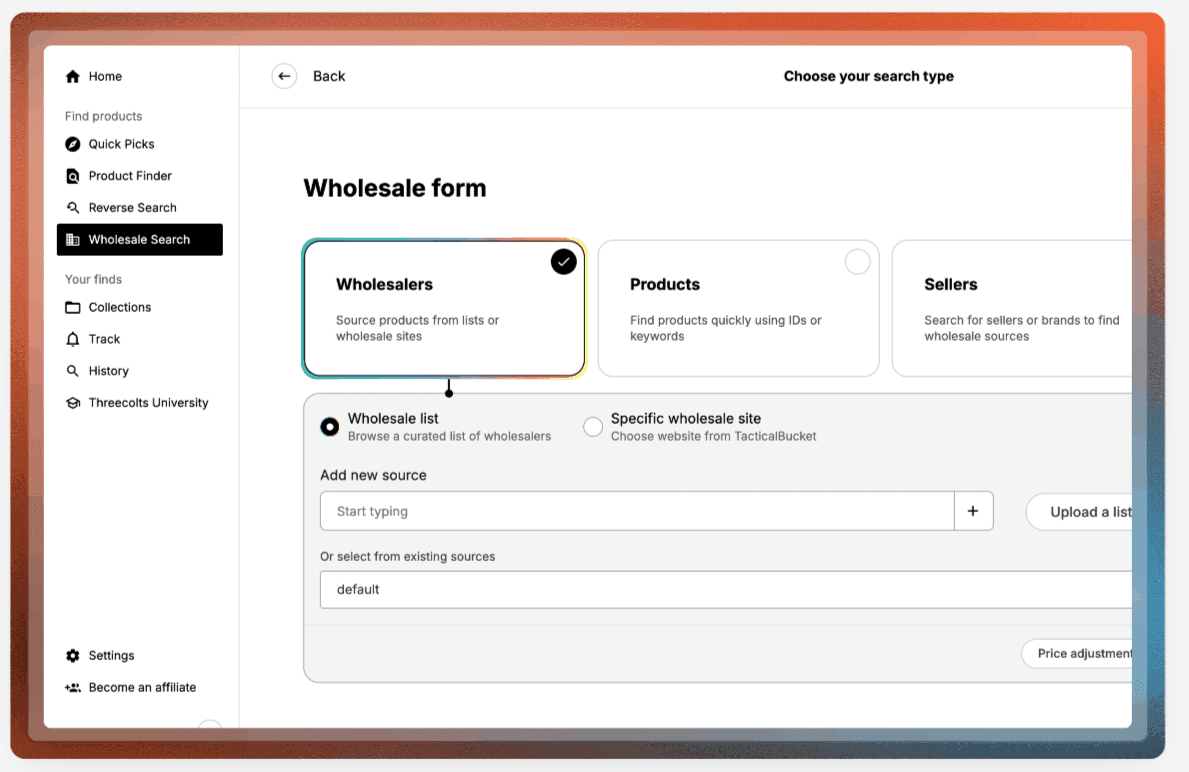
Tactical Arbitrage is the name most sellers learned first. It scans over 1,400 retail sites for price gaps against Amazon and includes a Wholesale Search for uploading supplier manifests and filtering for profitable items. The critical 2026 update: it is no longer sold standalone to new users. It now lives inside Threecolts' Seller 365 bundle at $69/mo alongside nine other apps, including InventoryLab and SmartRepricer.
Strengths
- Mature, battle-tested scanning with more source-site coverage than anything comparable.
- The bundle is real value if you would use several of the included apps anyway; repricing, inventory, and sourcing in one subscription.
- Historical Buy Box and rank charts built into results support better buy decisions.
Weaknesses
- If you only want the sourcing tool, you are paying for a ten-app suite to get it.
- The learning curve was a common complaint long before the bundling, and it has not gotten simpler.
- Its DNA is online arbitrage. Wholesale Search is capable, but wholesale is not the product's center of gravity.
Pricing: Seller 365 bundle at $69/mo for 10 apps, with a 14-day free trial. Legacy standalone plans persist for existing subscribers only.
5. Scan Unlimited: Best for High-Volume Wholesale List Scanning
Scan Unlimited does one thing: it scans wholesale supplier lists fast, at 100,000+ products per hour on the free tier and up to 600,000 on the top plan. For sellers processing several large catalogs a week, that speed is the whole pitch. Worth knowing before you commit: the tool has changed hands twice, joining Carbon6 in 2022, which was then acquired by SPS Commerce in 2025.
Strengths
- Purpose-built for bulk wholesale scanning, with real speed at high volume.
- A genuinely free tier (1 file per month, up to 10,000 products per file, no card required) that lets you test with a real supplier file before paying.
- Clean, focused product without suite bloat, and monthly billing at accessible prices.
Weaknesses
- You cannot run a scan until you connect an Amazon marketplace to your account; we hit this wall firsthand when testing the free tier. The tool queries Amazon's product data through your credentials, so plan on linking your seller account before your first upload.
- Filters focus on price and rank, not eligibility depth; restriction and IP checking are thinner than Seller Assistant's.
- Two acquisitions in three years leaves the product's long-term direction inside a much larger supply-chain company, which is worth weighing for a tool you build a workflow around.
Pricing: Limited free tier; Unlimited $70/mo; Unlimited Plus $100/mo (adds 600K/hour speed, courses, and extra tools). Annual billing discounts available. Verified from the in-app billing page, August 2026.
6. Analyzer.Tools: The Budget Bulk Analyzer
Analyzer.Tools is the lean option for supplier spreadsheet analysis: upload a price list, get ASIN matching, profitability math, historical sales and pricing data, and brand protection signals. It exists for sellers who want scanning without paying for a platform.
Strengths
- The lowest-cost serious entry into bulk analysis, from $49/mo, with short trial licenses that let you test cheaply.
- Covers the core wholesale scanning job competently: matching, fees, ROI, history.
- Simple enough to hand to a VA without a training program.
Weaknesses
- A smaller operation than its rivals, with a dated interface and fewer workflow features around the core scan.
- Plan structure (Windows app vs Web vs Web Pro) is confusing, and the data depth you want sits on the top tier.
- Like every scanner here, it needs you to already have supplier price lists. It finds nothing on its own.
Pricing: From $49/mo depending on version; 2-day and 5-day unlimited trial licenses available.
7. SaleHoo: The Beginner Directory
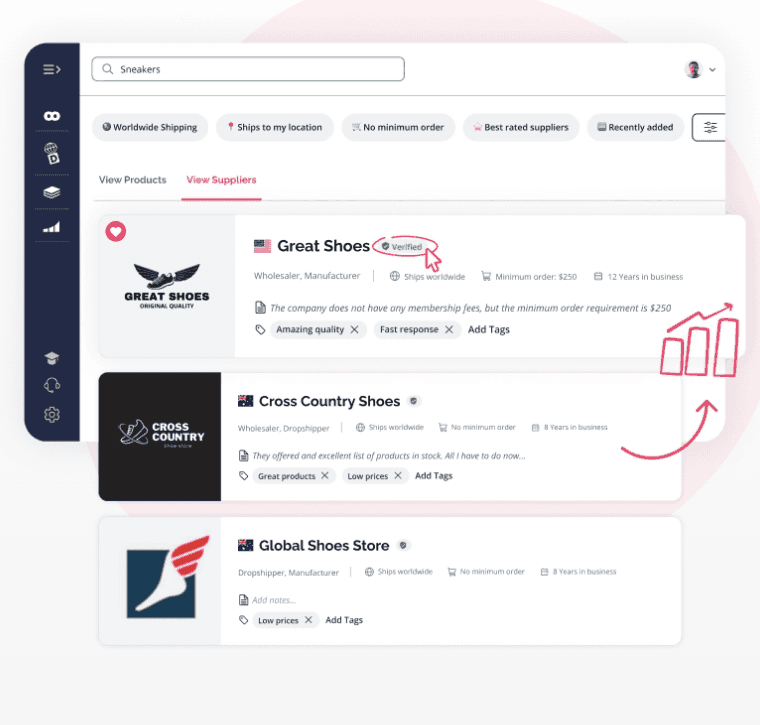
SaleHoo is the longest-running name on this list, a directory of 8,000+ vetted suppliers operating since 2005, now paired with a Shopify dropshipping product. For the wholesale side, the relevant product is the Directory at $67/yr or a $127 lifetime option, with a 60-day money-back guarantee.
Strengths
- Extremely cheap, and the supplier vetting is real; it filters out the outright scams that plague open searching.
- Lifetime pricing means a beginner can buy it once and keep it as a reference.
- Training resources and community make it a reasonable on-ramp for someone brand new to sourcing.
Weaknesses
- It is the classic directory model: you pay for names and contact details up front, then discover pricing, stock, and fit only after outreach. There are no live numbers, so every contact is a gamble of time.
- Coverage skews toward dropshipping and general ecommerce; serious US wholesale distributor depth is limited.
- Static listings age. A directory entry cannot tell you whether a supplier's pricing or stock is current today.
Pricing: Directory $67/yr or $127 lifetime; separate Shopify dropship plans from $27/mo.
Which Tool Should You Pick?
Match the tool to the job, not the brand name.
You have winning products and need suppliers for them. This is reverse sourcing, and it is what B2B Supplier Hub is built for. Search free, judge the numbers, reveal a supplier when the deal already makes sense. If sourcing alternatives for proven products is your bottleneck, start here
You are hunting for new brands to open accounts with. SmartScout. Nothing else profiles brand-level opportunity as well. Expect to do the supplier outreach yourself afterward.
You receive supplier price lists and need to find the profit inside them. Seller Assistant if you want workflow depth and restriction checking, Scan Unlimited if raw volume and speed matter most, Analyzer.Tools if budget is the constraint.
You want one subscription covering sourcing plus operations. The Seller 365 bundle with Tactical Arbitrage, provided you will genuinely use the other apps.
You are brand new and want a safe starting reference. SaleHoo's lifetime directory is a low-risk education. Just go in understanding you are buying names, not numbers, and budget the outreach time accordingly.
Most established wholesale operations end up running two tools in parallel: one for discovery (finding suppliers or brands) and one for analysis (scanning the price lists that discovery produces). The mistake is buying two tools that do the same half of the job. For the fuller picture of how these stages fit together, see our complete guide to finding wholesale supplier
Note: Prices and features verified August 2026 and subject to change; confirm details on each vendor's site.
Frequently asked questions
01 What is the best wholesale sourcing software for Amazon sellers?
02What is reverse sourcing?
03Are wholesale supplier directories worth it?
04Can wholesale sourcing tools get me approved with distributors?
05How much should I spend on sourcing software?
The B2B SupplierHub Team
Wholesale & sourcing
Stop hunting suppliers by hand. Type a UPC instead.
B2B Supplier Hub shows the suppliers in our network carrying a product on one page: wholesale cost, stock, and retail price side by side. Free to search, no card required.