
B2B Supplier Hub
Reverse Sourcing on B2B Supplier Hub: One Product, Start to Finish
Somewhere in your catalog right now, there is a product doing well through exactly one supplier. You know the one. It sells steadily, the margin works, and every reorder quietly depends on a single company staying stocked, keeping its price reasonable, and staying in business.
Finding a second source for that product is the job this post walks through, on a real product and screen by screen. The workflow is called reverse sourcing, which means working backward from a product to the suppliers who carry it. If the concept is new to you, the 5-step reverse sourcing workflow explains it properly. This post is where we actually do it: one processor, one session on B2B Supplier Hub, and a supplier shortlist a few minutes after the first search.
Start From a Proven Product (Our Example: an Intel Core i7 Processor)
Our example is an Intel Core i7-14700 processor. A recognizable product with steady demand, the kind of item a reseller might already be selling through one source and quietly worrying about, because processors are exactly the category where a single supplier's stockout or price move hurts. If you're still building your first list of sources, start with our guide to finding wholesale suppliers for Amazon FBA — this walkthrough assumes you already have a product that sells.
The starting point is the identifier. From your own listing, a marketplace page, or the box itself, you take the UPC, the MPN, or simply the product name, and you search it. If you're already looking at the product on Amazon, the Chrome extension brings the same answer to you right on that page, but for this walkthrough we'll stay on the platform.
Check the Supplier Count Before Anything Else
The product page opens with the picture that matters before any detail does: how many suppliers in our network carry this exact product, and what the average stock situation looks like.
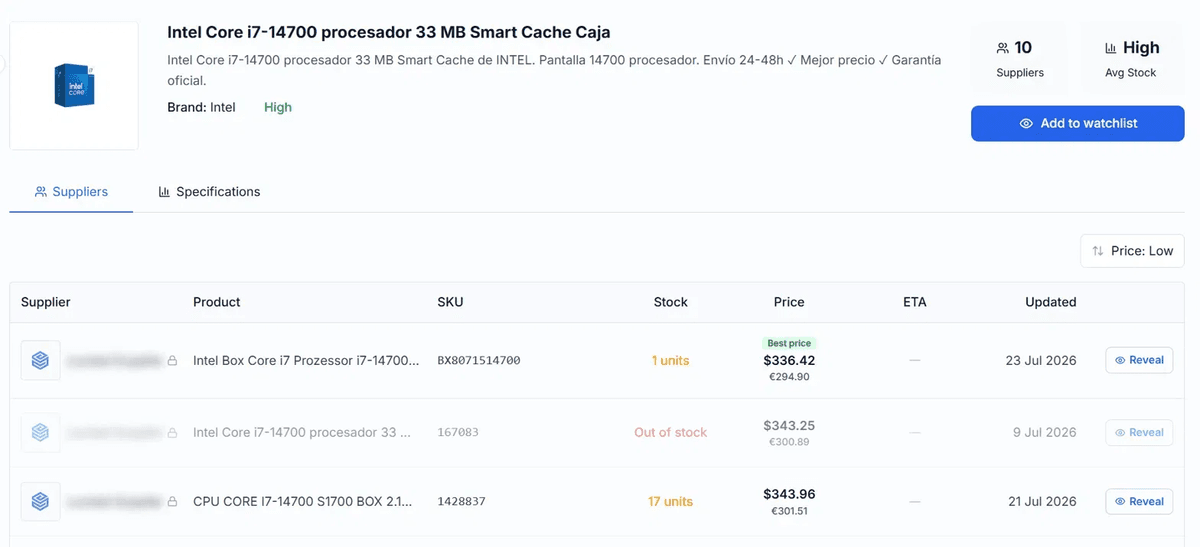
For our processor, that's ten suppliers. Before reading a single row, that number has already answered the biggest question a reseller carries into a sourcing session: is there anywhere else to go? Ten sources means options, leverage, and a real bench to build. If it had said one, that would be an answer too, just a different one, and you'd have learned it in ten seconds instead of three weeks of emails.
Read the Supplier Table: Best Price vs. Real Stock
Below the summary sits the supplier table: each masked supplier in its own row, with its price, its stock, and the date its data was last verified. Reading it top to bottom takes a minute, and even a quick scan turns up the kind of detail that changes decisions.
On our processor, the lowest price in the table is $336.42, tagged as the best price. The row right below it asks for about seven dollars more. Ordinarily that's an easy call, except the best-price supplier is holding a single unit, while the seven-dollars-more supplier has seventeen in stock. If you're buying one processor, the cheapest row wins. If you're restocking a listing that sells daily, the "best price" isn't the best choice at all, and the table just told you that without a phone call.
You can go much deeper in evaluating a supplier from the numbers alone. But even this quick scan shows the point: you can judge the deal before knowing a single name.
Model Your Margin Before Revealing Anyone
Under the supplier table, the platform overlays the product's retail price alongside estimated fees, and a margin calculator lets you plug in your own numbers: your selling price, the supplier cost from any row, and your fee assumptions. You can model the deal per supplier while their names are still hidden.
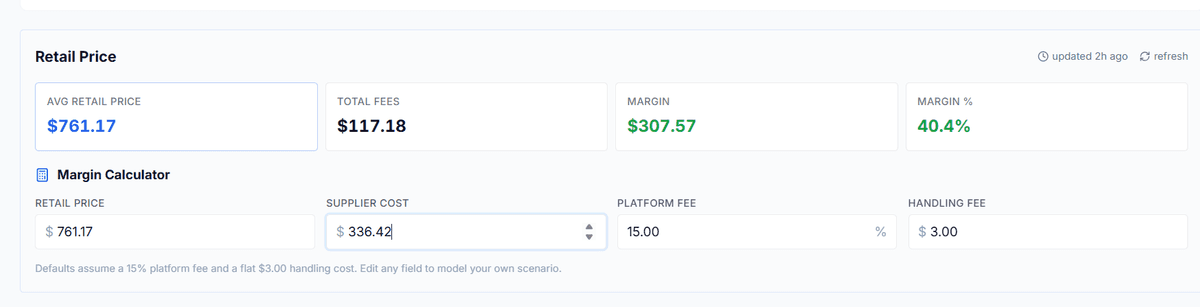
This is the moment worth pausing on, because it's the entire logic of the platform in one screen. By now you know how many suppliers exist, what each charges, who has real stock, how fresh the data is, and what the margin looks like at your price. The whole sourcing decision is made. The only thing you haven't spent is money.
Reveal One Supplier, Watchlist the Rest
Now comes the choice. When one row is clearly worth pursuing, you pay to reveal that supplier: their name and direct contacts open up, they're saved to your account permanently, and on paid plans their full live catalog opens with them. What reveals cost, what each tier includes, and how the 60-day auto-refund protects the credit are covered in our introduction to the platform, so we'll leave the mechanics to there.
The move that separates experienced users is what happens to the rows you didn't reveal. The runner-up suppliers, the seventeen-unit row, and the slightly pricier-but-deep-stock options go on the watchlist. Price change or restock, and you get the alert. Today's second choice is next quarter's backup, and building that bench before you need it is the discipline of building a three-supplier bench for your top Amazon SKUs. The watchlist is how the platform makes it passive.
And one honest note that belongs in every sourcing post we write: revealing a supplier gives you their numbers and a direct line. Distributors still run their own approval processes, and the relationship is still yours to build. That approval is its own process—here's what distributors look for before approving an Amazon seller. What's changed is that you now walk into that conversation knowing exactly what the market looks like.
The Result: A Supplier Shortlist in Minutes, Not Weeks
Count what happened in this session. One search. A supplier count. A price table with stock and freshness on every row. Margin modeled at your numbers. One supplier revealed three more on watch. Total elapsed time: a few minutes, and everything before the reveal was free.
The old version of this same session was calls that took a week to return, price lists that arrived stale, and a spreadsheet you maintained by hand. The work didn't get easier because the problem changed. It got easier because the information finally sits in one place.
Run it on your own product. Search your best seller at b2bsupplierhub.com, for free, no card required, and see how many suppliers come back. The network currently covers Electronics, Sports & Outdoors, and Tools & Home Improvement, with more categories on the way.
Frequently asked questions
01What if my product shows no suppliers?
02Do I have to reveal a supplier to see the margin?
03What happens right after I reveal a supplier?
04Do I need the Chrome extension for this?
The B2B SupplierHub Team
Wholesale & sourcing
Stop hunting suppliers by hand. Type a UPC instead.
B2B Supplier Hub shows the suppliers in our network carrying a product on one page: wholesale cost, stock, and retail price side by side. Free to search, no card required.