
B2B Supplier Hub
Find Who Supplies an Amazon Product
Most sourcing doesn't start at a desk with a spreadsheet open. It starts when you're on Amazon, looking at a product that's clearly selling, and you think, I want in on this one.
Then the slow part begins. You copy the UPC. You open a few new tabs. You start hunting for who might carry it. By the time you've done all that, the momentum is gone, and half the time the product you were excited about is now just another line on a list you'll get to later. The B2B Supplier Hub extension closes that gap. It shows you who supplies a product while you're still looking at it, and if nobody does yet, you can ask us to find one without ever leaving the page. Here's how it works.
Why Amazon Sourcing Breaks Your Flow
You find your best products by browsing. You're on a listing, you notice something moving well, and that's the moment the idea lands. But acting on it means stopping what you're doing, leaving the page, and starting a whole separate task somewhere else.
That switch is where good ideas die. Not because the research is hard, but because there's a gap between spotting a product and finding its supplier, and every gap is a chance to get pulled away, forget, or lose interest. The winner you spotted five minutes ago never gets sourced, because sourcing it meant breaking your flow.
See Who Supplies a Product Right on the Amazon Listing
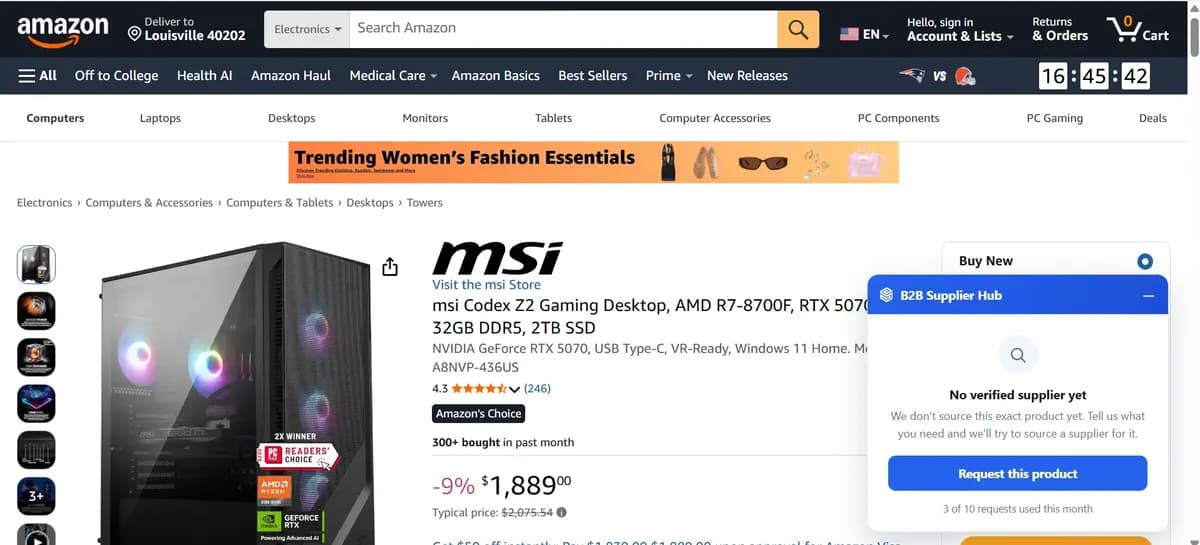
The extension puts the answer on the page. When you open an Amazon product, a card appears on the listing and looks for that exact product in the supplier network.
If it's there, the card shows you how many distributors carry it and the lowest wholesale cost, right away. You can compare each supplier by cost and stock, see the real numbers, and connect with the one that works, all without leaving the listing you were already on. No copying the UPC, no new tabs, no separate search. The product you're looking at and the suppliers behind it are in the same place.
It works on Amazon.com, .co.uk, and .de, in Chrome, Edge, and Brave.
No Supplier Yet? Request One Without Leaving Amazon
Sometimes the card comes back with no match. The product isn't in the network yet. Before, that was a dead end. You'd close the tab and move on or go back to hunting on your own. Now the card gives you a button instead: request this product. One click, right there on the listing, and our team goes and does the outreach to find a verified distributor who carries it. The card even shows how many requests you have left for the month, so you always know where you stand.
That's the part that changes the whole thing. The moment you hit a dead end is the same moment you can do something about it, in the same place, without switching to anything else. You spotted a product, there was no supplier, and instead of giving up you handed it to us and kept browsing.
What Happens After You Request a Supplier
Once you've sent a request, the process is simple and the promise is clear.
Request submission is free on every plan, up to ten requests a month. Our team works to bring on a verified distributor who carries the product, and you hear the outcome within 30 days, either way. If a distributor comes on board, the product shows up in your search with full cost, stock, and retail price, the same as everything else in the network. And if it turns out the product has closed distribution and can't be sourced, we tell you that too, inside the same window.
Once a supplier is found, connecting works like any other listing: a credit on a paid plan, or a one-time fee on a free account. You can read the full details of how requests work in our guide to sourcing requests.
Why Point-of-Discovery Sourcing Works
Sourcing shouldn't be a separate job you set aside time for. The best products show up while you're already working, browsing, checking listings, watching what sells. The problem was never a shortage of ideas. It was that acting on them meant stopping everything and starting over somewhere else.
Doing it on the page fixes that. You see who supplies a product the moment you're curious about it, and if nobody does, you ask for one without breaking stride. A winner never slips away just because researching it was a hassle, because now it isn't one. Add the extension, open a product you've been looking for, and see who supplies it. If nobody does yet, that's a request, not a dead end.
Frequently asked questions
01Which browsers and sites does the extension work on?
02Do I need an account to use it?
03Is requesting from the extension different from requesting on the website?
04What if no supplier can be found?
The B2B SupplierHub Team
Wholesale & sourcing
Stop hunting suppliers by hand. Type a UPC instead.
B2B Supplier Hub shows the suppliers in our network carrying a product on one page: wholesale cost, stock, and retail price side by side. Free to search, no card required.