
B2B Supplier Hub
Can't Find a Supplier? Now You Can Request One
Every sourcing platform has the same limit: it can only show you the suppliers already in it. Until now, if you searched for a product on B2B Supplier Hub and the network didn't carry it, the search ended there. You saw an empty result, and the next step was back to Google.
That gap is now closed. Sourcing Requests let you tell us what you're trying to buy, and our sourcing team goes looking for a distributor who carries it. If we onboard one, the product appears in the network, and you're notified within 30 days, either way
What Sourcing Requests Actually Do
A sourcing request is a direct line to our sourcing team. You submit the product you need, a sourcing manager picks it up, and we work on bringing a distributor who carries it onto the platform.
This is worth being precise about, because it's different from how most "request" features work elsewhere. You're not submitting a support ticket, and you're not asking us to search a database we already have.
You're asking us to go recruit a supplier that isn't on the platform yet. When it works, the result isn't a one-off answer emailed back to you; the distributor gets onboarded, their catalog joins the network, and the product becomes searchable with the same cost, stock, and verification data as everything else.
That also means the outcome benefits more than the requester, and it means the timeline is longer than a search. Onboarding a distributor is a real business process: outreach, qualification, agreement, and data integration. That's why we give ourselves up to 30 days, and why you hear the outcome either way.
How to Submit a Request
Sourcing Requests live inside your account, so the first step is signing in. If you don't have an account yet, creating one is free and takes a minute, with no card required, and requests are available on free accounts.
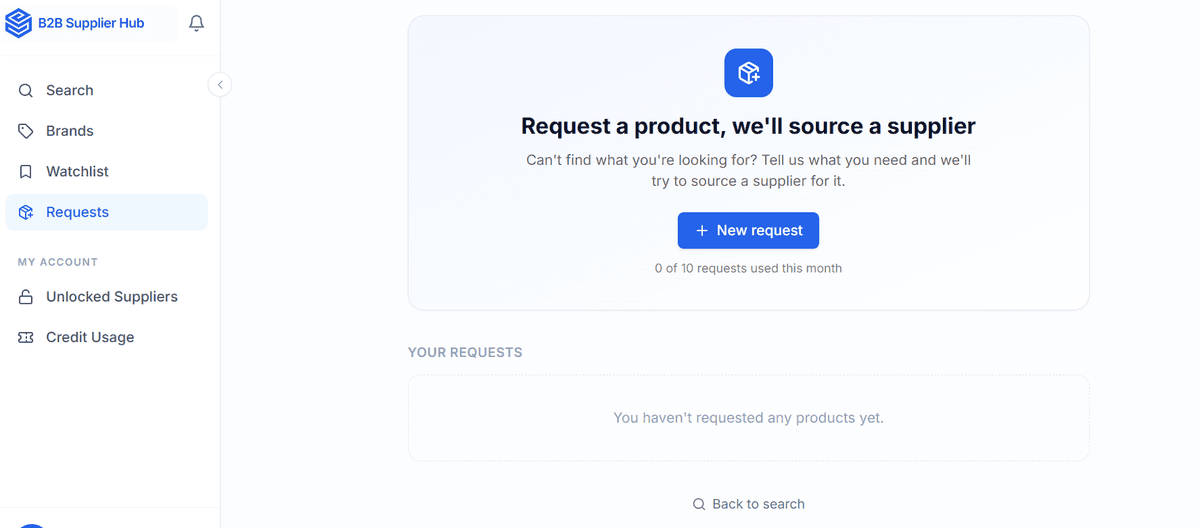
Once you're signed in, look at the left sidebar of your dashboard. Requests sits below Search, Brands, and Watchlist. Open it and click New request.
The form asks for three required details and three optional ones. Required: the product name, the brand, and a reference link to the product somewhere else, which can be an Amazon listing, a manufacturer page, or any page showing exactly what you mean. That link matters more than it looks; it removes ambiguity about which specific variant, size, or model you're after.
Optional but genuinely useful: quantity needed, target price per unit, and an additional details box. These three change how we prioritize and approach the sourcing. If you use the Chrome extension, you can submit a request from wherever you spot the product" — pending confirmation of how it actually works in the extension.
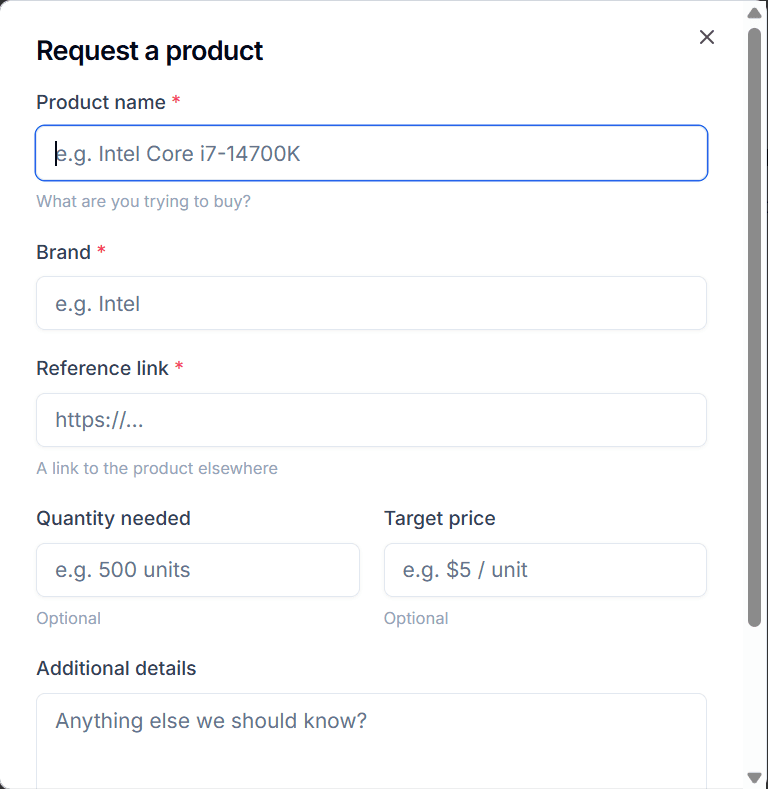
A request for 500 units at a stated target price tells a sourcing manager whether a realistic deal exists before they start outreach, and it gives them something concrete to open a distributor conversation with. Requests that include them tend to be actionable faster, so fill them in when you can.
What Happens After You Submit
Your request appears under Your Requests with a status attached, starting at Received. That list is your tracker; you don't need to email anyone to check on progress, just sign in and look.
From there, a sourcing manager takes the request and begins working it: identifying which distributors carry the product, approaching them, and running them through the same verification every supplier on the platform goes through.
We deliberately don't quote a turnaround time, and it's worth explaining why rather than inventing a number. How long a request takes depends almost entirely on the distributor, not on us. Some brands have distributors who respond in days and onboard quickly.
Others require weeks of outreach or have a distribution network that turns out to be closed. A promised timeline we couldn't reliably hit would be worse than no timeline at all, so instead of a countdown, you get a definite answer when there is one.
You'll be notified either way, by both in-app notification and email. If we successfully onboard a distributor, the product becomes searchable with its wholesale cost, stock, and verification date visible like any other listing. If we can't source it, you're told that too. We'd rather close the loop with a clear no than leave a request sitting in limbo, because an unanswered request is worse than a fast negative.
The Limits, Stated Plainly
Ten requests per month, per account. The counter sits right on the Requests page so you always know where you stand.
One thing to be upfront about: an unsuccessful request still uses one of your ten. We know that isn't the friendliest policy, so here's the reasoning.
A sourcing manager spends the same real hours chasing a distributor whether or not the outreach ends in an onboarding, and a failed attempt still produces useful information about which brands have closed distribution. If unsuccessful requests were free, the queue would fill with speculative submissions, and every request would get less attention, including yours.
The practical implication is simple: spend your ten on products you actually intend to buy. A request with a real quantity, a real target price, and a reference link to the exact item is far likelier to succeed than a vague one, and choosing carefully costs you nothing but a minute of thought.
The feature is free right now. It may not stay free. We'd rather tell you that upfront than quietly change it later: sourcing a supplier on request costs us real staff time, and if volume grows the way we expect, the economics may move it into the paid plans. If that happens, we'll say so clearly before it takes effect.
What a Successful Request Gets You (and What It Doesn't)
When a requested supplier is onboarded, they behave exactly like every other supplier in the network. You'll see their wholesale cost, live stock depth, retail price, and last-verified date for free, with the supplier's identity masked, which is how the free tier works across the whole platform.
To get their name and direct contact details, you unlock them the normal way, which requires a Basic or Pro plan. Requesting a product doesn't include the unlock, and it doesn't create any exclusivity: the distributor joins the network for everyone, and you're simply the person who prompted it and the first to know.
That distinction is deliberate. The request feature closes the discovery gap, not the paywall. Everything on the numbers side stays free, and payment still happens only at the connection.
When to Use It (and When Not To)
Use a request when a search comes back empty for a product you have real intent to buy, when you're expanding into a brand the network doesn't cover yet, or when you're planning ahead for a season and want the supply lined up early.
Requests with a stated quantity and target price are the ones most likely to turn into an onboarded supplier, because they give a sourcing manager a concrete deal to present.
Don't use it as a substitute for searching first, and with a capped, non-refundable allowance, this matters more than it sounds. Search by UPC, MPN, brand, and product name before requesting, since a product can be listed under a name you didn't try.
Requests are also the wrong tool for products outside the categories we currently cover, though telling us about those is still useful; category expansion follows demand, and requests are one of the signals we read.
Try It on Something You Couldn't Find
If there's a product you searched for on B2B Supplier Hub and came up empty on, that's the request to submit first. Sign in, open the Requests tab in your sidebar, paste a reference link, add the quantity and target price if you know them, and let a sourcing manager take it from there.
Don't have an account yet? Creating one is free and takes a minute. Ten requests a month, free for now, and every successful one makes the network deeper for the next search.
Frequently asked questions
01Do I need an account to submit a sourcing request?
02How much does a sourcing request cost?
03What if you can't find a supplier?
04Do I need a paid plan to submit a sourcing request?
05Does requesting a product give me exclusive access to that supplier?
06How long does a sourcing request take?
The B2B SupplierHub Team
Wholesale & sourcing
Stop hunting suppliers by hand. Type a UPC instead.
B2B Supplier Hub shows the suppliers in our network carrying a product on one page: wholesale cost, stock, and retail price side by side. Free to search, no card required.