Most resellers run into this the same way. A product has been selling well for a few months. Then the supplier runs out of stock, or raises the price, and you need another source. The first thing you do is try to work out who makes it. So you pick up the box and read the small print. Instead of one company, you find three or four. There's a brand on the front. There's a "Distributed by" name on the back. The online listing shows a different "manufacturer." And the barcode traces back to someone else again.
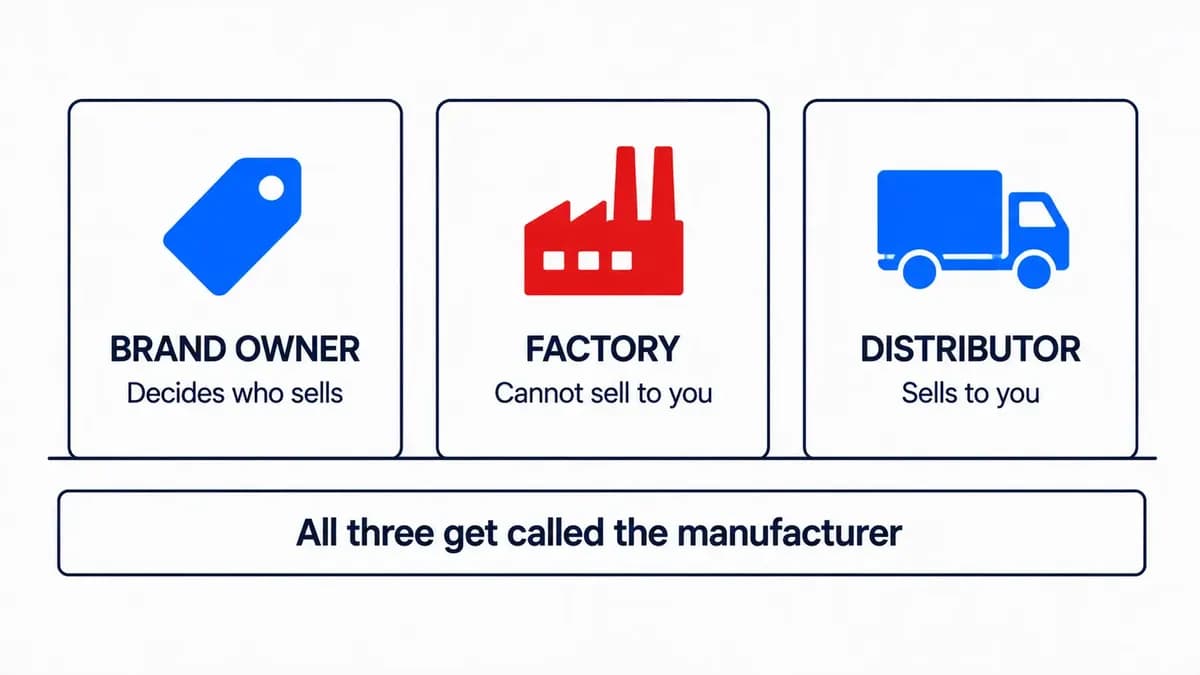
Each of those names is telling you something different. That's why so many people lose weeks on how to find the manufacturer of a product. The word "manufacturer" gets used for three separate companies, and only one of them will ever sell to you.
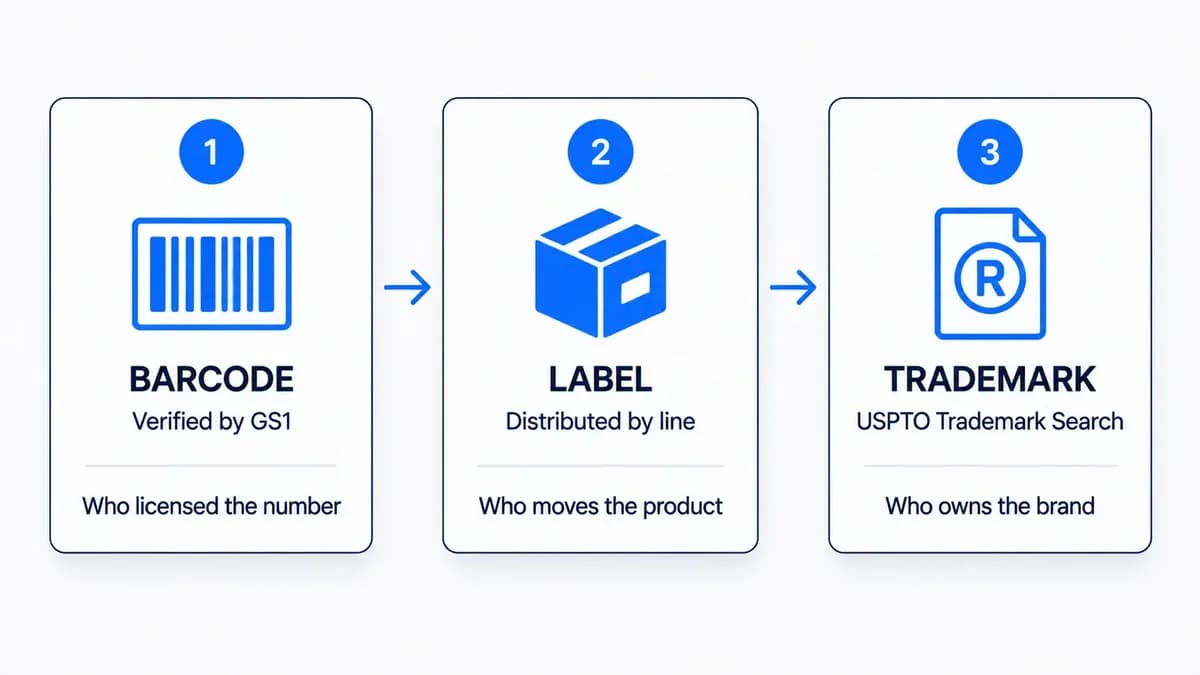
This post covers the three records worth checking, in order: the barcode, the label, and the trademark. All three are free. None takes more than a few minutes. Together, they tell you who owns the brand, and usually who distributes it too.
Before you start, one shortcut. If you already have the UPC, search it free on B2B Supplier Hub. If verified distributors in our network carry the product, you'll see real cost and real stock right away, and you can skip the rest of this. Everything below is for when that search comes up empty, or when you want to be sure who's behind a product.
Manufacturer vs Brand Owner vs Distributor: Which Do You Need?
Behind almost every product on a shelf, there are three companies. People call all of them "the manufacturer."
The first is the brand owner. That's the company whose name is on the front of the box. They own the trademark. They decide which distributors get to carry their products and which resellers get approved. If you're trying to source something, this is the company that matters most.
The second is the factory. That's who actually made the item. Very often it's a contract factory that makes products for several brands at the same time. The factory doesn't sell to resellers, and it can't give you permission to sell anything. For you, it's a dead end.
Frequently asked questions
How do I find out who makes a product?
Check three places. Look up the barcode number in Verified by GS1. Read the "Distributed by" or "Manufactured for" lines on the packaging. Then check the trademark owner in the USPTO's Trademark Search. Together they tell you the brand owner, and usually the distributor too.
Can I find the manufacturer from a barcode?
You can find the company that holds the license for the barcode number. That's usually the brand owner. It won't tell you which factory made the item, and it isn't always the brand itself, so confirm it with a trademark search.
What does a GS1 prefix lookup tell you?
It tells you which company holds the license for that barcode prefix, and it lets you see what else they've registered. It doesn't tell you where the product was made.
TB
The B2B SupplierHub Team
Wholesale & sourcing
Stop hunting suppliers by hand. Type a UPC instead.
B2B Supplier Hub shows the suppliers in our network carrying a product on one page: wholesale cost, stock, and retail price side by side. Free to search, no card required.
The third is the distributor or importer. That's the company on the "Distributed by" or "Imported by" line. It buys from the brand and sells onward. Of the three, this one is closest to an actual purchase.
Keep these three in mind. Every clue below points to one of them, and knowing which one keeps you from calling the wrong company.
1. Find the Manufacturer From a Barcode (GS1 Lookup)
The number under the barcode is the fastest place to start.
Barcode numbers are first handed out by GS1, the organization that runs the barcode system worldwide. The first part of the number is the company prefix. GS1 keeps a public record of who holds each prefix, and anyone can search it.
The result is the name of the company that holds the license for that number. Usually that's the brand owner. But not always. Sometimes it's a parent company, a partner, or a distributor that registered the number for the brand. So treat it as a good lead, not a final answer. You'll confirm it in the trademark step.
There's one more thing the tool can do that's easy to miss. The GS1 database also lets you search by company name. Once you have the name that came back, search for it. A real brand will show a whole list of products under that prefix. If you only see one or two items, you're looking at a very small brand, and that tells you how much time it deserves.
There are two things that confuse people about barcodes.
Some barcode numbers are also secondhand. Numbers given out before 2002 can be sold to other companies. So a lookup can return a barcode reseller, or a company with no connection to the product at all. When that happens, there are a few common reasons. The number was bought secondhand. The brand was sold to a new owner. Old packaging was reused. Or the brand never joined GS1. Don't guess which one it is. Write down the name and move on to the label.
2. Read the Label: "Distributed By" and "Made For"
Now turn the box over and read the fine print. Some lines are more useful than others. Here's how they rank.
"Distributed by" is the best line on the box. That company already buys from the brand and sells it onward. No other line on the label gets you closer to a source you can buy from.
"Imported by" does the same job for foreign brands. When a product is made overseas and sold in the US, the importer is often the brand's US office or its main US distributor.
"Manufactured for [Brand]" tells you two things. A contract factory made it, and the brand is the one you want. Skip the factory and focus on the brand name.
"Made by" or "Mfd. by" with an address could be the brand or the factory. Write down the name and compare it with what the barcode gave you.
The model number or MPN isn't a company, but it's a very good search term. Searching a model number often takes you to the brand's own product page, which usually names the company clearly.
On packaged goods, these lines are on the back or the bottom of the box. On electronics and tools, they're usually on a small label near the barcode or pressed into the product itself.
One warning while you compare. Online listings sometimes show a manufacturer that doesn't match the label at all. When they disagree, trust the label. The label came from the packaging line.
3. Confirm the Brand Owner With a Trademark Search
By now you have one or two company names. The trademark record shows who really owns the brand.
The tool is the USPTO's Trademark Search at tmsearch.uspto.gov. Older guides mention a tool called TESS. Ignore them. The USPTO replaced TESS with this new search system at the end of November 2023. Search the brand name exactly as it appears on the front of the box. Open the live record. Look for the current owner. That company, at that address, decides who is allowed to sell the product. That's your brand owner.
Now compare it with the barcode result. If the trademark owner and the GS1 record show the same company, you've confirmed it. If they show different companies, that's normal. It's usually one of the reasons from the barcode section. Keep both names, because one of them is probably the distributor you'll want next.
If the owner is a foreign company, your best lead is the importer line from the label. That importer is usually how the brand gets into the US. If you want a fuller picture of a brand, the search also lets you pull up everything one company owns by searching the owner field. That's useful when you want to see which other brands belong to the same parent company.
Bonus for Electronics: Find the Factory With an FCC ID
If a product has a wireless part, like Bluetooth, Wi-Fi, or a remote, it should have an FCC ID on the label. This one is worth checking for a single reason: it shows you the factory.
Know what you're looking at, though. The grantee is the company that filed the paperwork. That's often the factory or an agent, not the brand. So this tool rarely tells you who to buy from. What it does tell you is whether the same product is sold under other brand names too. The record includes photos of the inside and outside of the device, plus label drawings, so you can see whether the certified unit matches yours.
Sometimes the brand is the only seller. Plenty of brands don't sell to new resellers, and many small brands don't sell through anyone but themselves. If every record keeps pointing to the brand owner and nobody else, take that seriously and don't spend weeks on it. The flagship guide above explains how to tell when a brand is closed to new resellers.
If it's a foreign brand with a US importer, contact the importer. They're either the distributor, or they know exactly who is. And if you reach the end of all this and still can't find a real supplier, that's what Request a Supplier is for. You submit the product. Our team finds a verified distributor who carries it and brings them onto the platform. It's free on every plan, and you get an answer within 30 days either way.
From Manufacturer to a Supplier You Can Buy From
Think back to that box with four different names on it. Now you know what each one is. One owns the brand. One built it. One distributes it. And one probably just sold a barcode number a long time ago.
The factory was never the one you needed. What you need is a supplier who will sell to you at a cost that works, with stock that's really there. So once you have the brand name, take the direct route. Search the product free and see what every verified distributor in our network carrying it charges, and how much they have, before you apply to anyone. If it isn't there yet, submit a request and let our team go find it.
Does the barcode show the country of origin?
No. The prefix shows which GS1 office gave out the number, not where the product was made. A product with a US prefix can be made anywhere in the world.
Why doesn't the manufacturer on a listing match the label?
Listings and labels sometimes disagree. When they do, trust the label. The label came from the packaging line. The listing didn't.

-1200x627.webp&w=3840&q=75)