
B2B Supplier Hub
How Does B2B Supplier Hub Work? From First Search to Supplier Contact
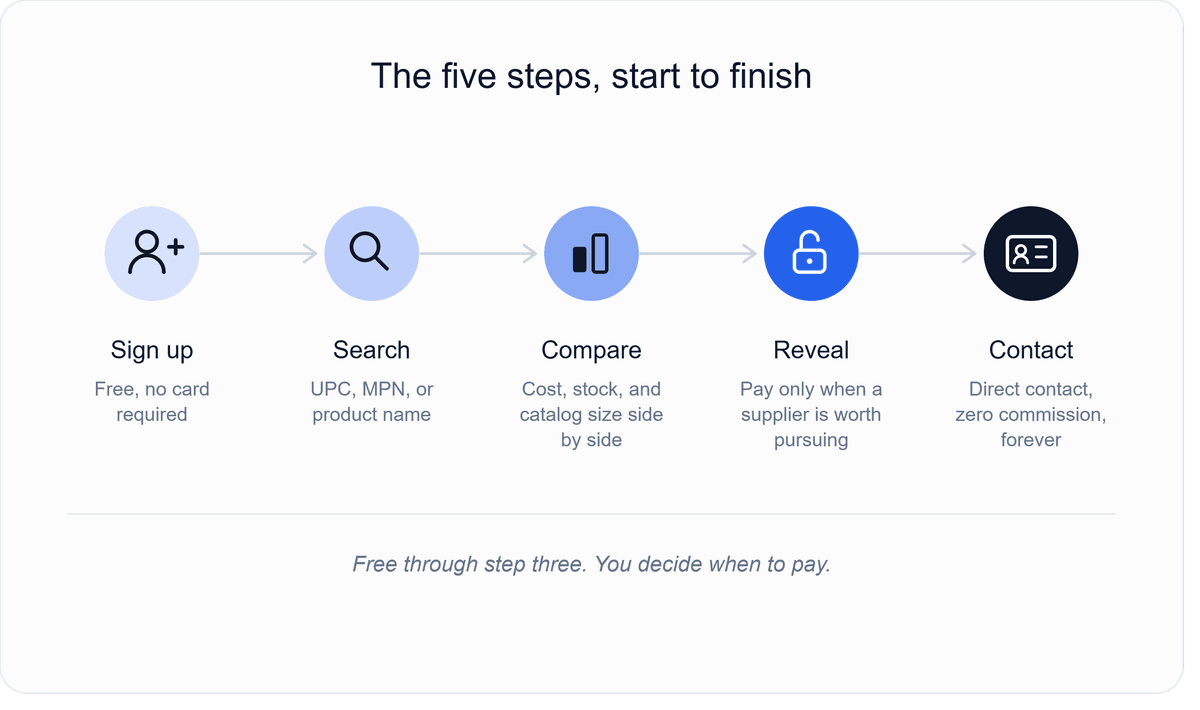
B2B Supplier Hub works in five steps. You start free by creating an account, with no card required. You search for a product by UPC, MPN, or name and see the exact wholesale cost and live-stock from every distributor carrying it, completely free. You compare those suppliers side by side on cost, stock depth, and catalog size.
When you find one worth pursuing, you reveal their contact information for a one-time cost or as part of your monthly plan. Once revealed, you connect and order directly, with no commission and no middleman, and that supplier is yours to keep even if you cancel later.
Picture the way most sellers currently find a new supplier. A product is selling well, so they open a new tab, search the brand name plus "wholesale distributor," and start down the traditional route to finding an authorized distributor: directory sites, cold emails, and phone calls that may or may not go anywhere.
Days pass before anyone even confirms a price, and by the time a real answer comes back, the seller has usually lost track of which distributor quoted what or whether the stock they were told about is still actually available. B2B Supplier Hub exists because that process shouldn't take days. It should take a search bar.
This is a walkthrough of what actually happens when you use it, written the way a first session actually goes rather than as a list of features. If you're new to the platform entirely, what B2B Supplier Hub is and why we built it covers the background; this post covers the whole path from creating your account to having a supplier's contact information in front of you, along with what's happening behind the scenes at each step to make the numbers trustworthy.
Step 1: Start Free and Create Your Account
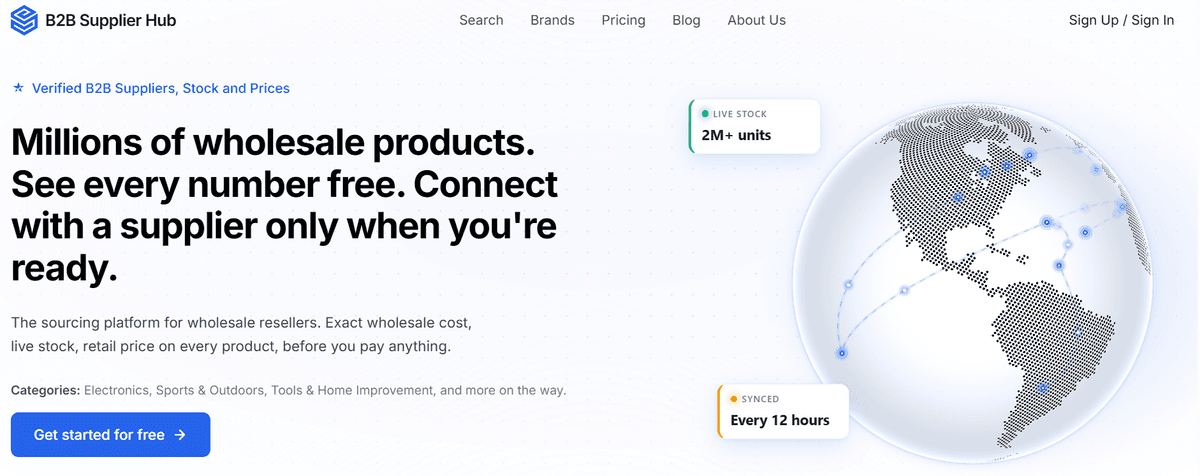
Everything begins with a free account. Click Start Free, sign up, and log in — that's the whole step. There's no card required and no trial clock, because the account isn't a paywall; it's simply where your searches, watchlist, and any suppliers you later reveal live. Once you're logged in, the search bar is in front of you, and the real work starts.
Step 2: Search Any Product by UPC, MPN, or Name
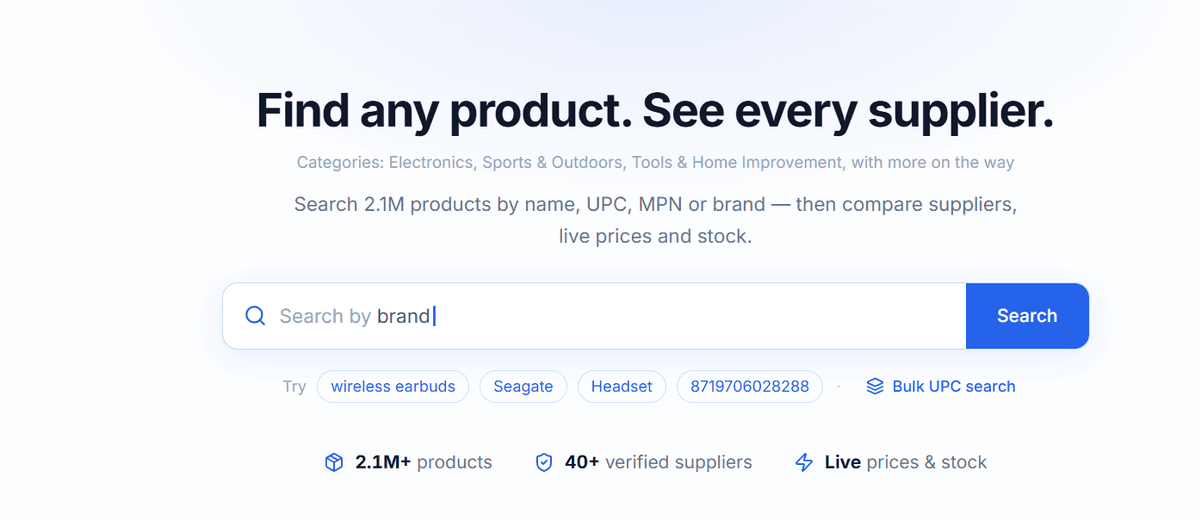
The starting point of the research itself is the search bar, and what you type into it matters. You can search by UPC, by MPN, or by the product name itself, whichever you have on hand. This matters because most sourcing research starts from a specific product, not a general category. You already know you want to sell a particular cordless drill or a specific pair of wireless earbuds. You don't want to browse a category tree to find it.
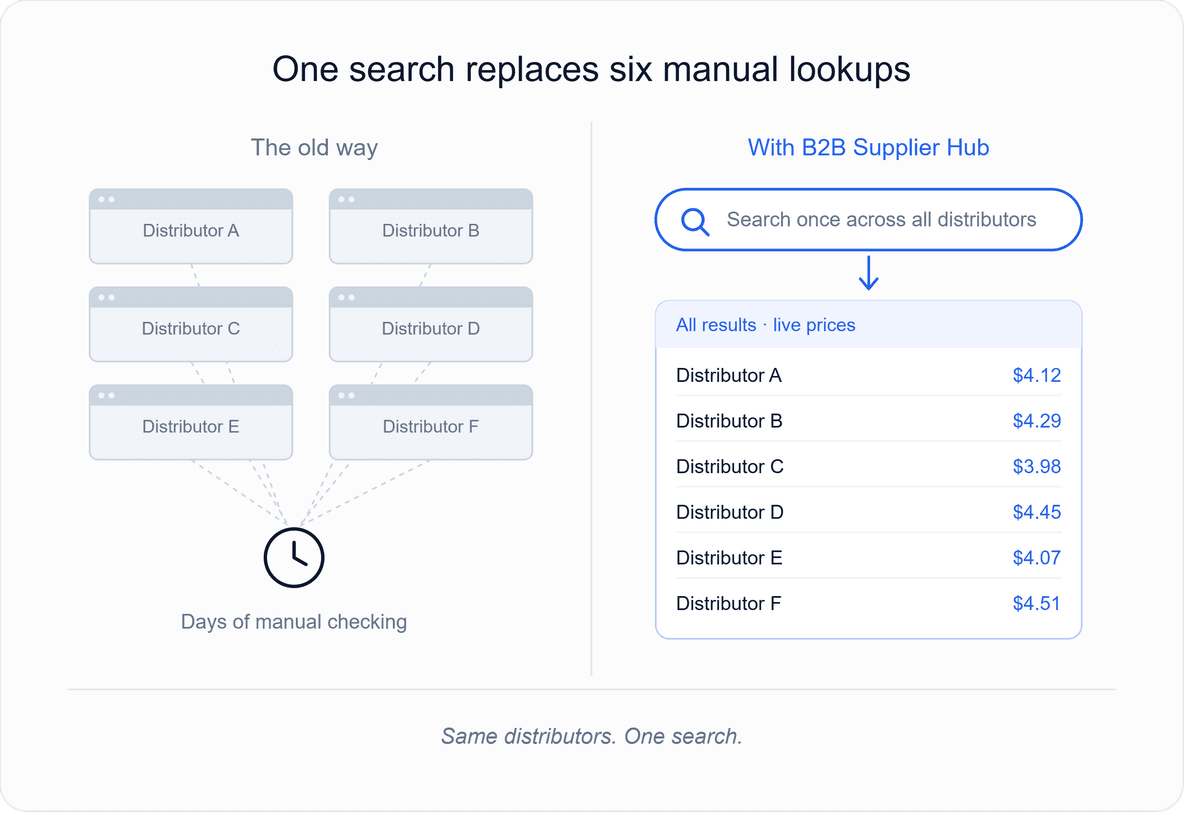
When the search runs, what comes back is not a single listing. It's every distributor in the network that carries that exact product, shown together with the exact wholesale cost and live-stock level from each one. This is the part that replaces the old process of opening six different supplier portals and checking each one manually. One search covers what would otherwise be six separate lookups. And if you do most of your product research on Amazon itself, the B2B Supplier Hub Chrome extension brings this same lookup directly onto Amazon product pages.
Step 3: Compare Wholesale Suppliers Side by Side
Once the results are in front of you, the comparison itself is the point. For every distributor carrying that product, you can see the cost, how deep their stock is, and the size of their broader catalog side by side. This is meant to answer a specific question quickly: which of these suppliers is actually worth pursuing, based on real numbers rather than a sales pitch. Price is the fastest signal, but it isn't the only one — our framework on the factors worth comparing beyond just price walks through the full checklist.
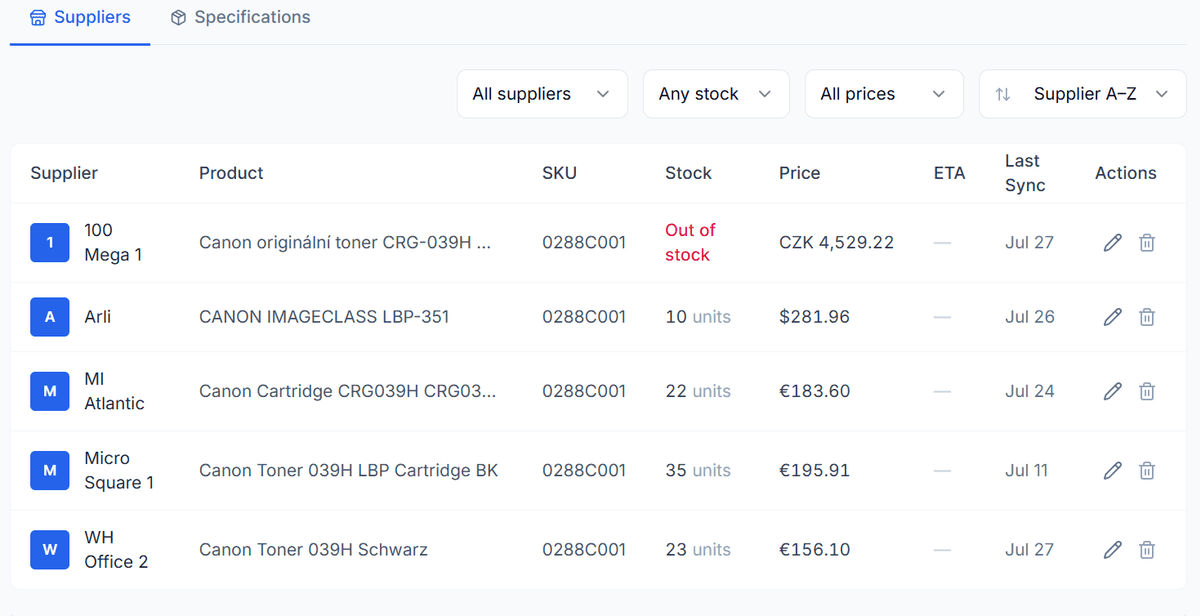
This is also where the platform's approach to data quality matters most, because a comparison is only useful if the numbers are current. Every listing shows exactly when it was last verified, and if a particular feed has gone stale, that gets flagged before you make a decision on it rather than after you've already reached out to a supplier based on outdated information. The difference between a live number and a stale one is the difference between a comparison you can trust and one you have to double-check yourself.
Step 4: Reveal the Supplier's Contact Information (Only When It's Worth It)
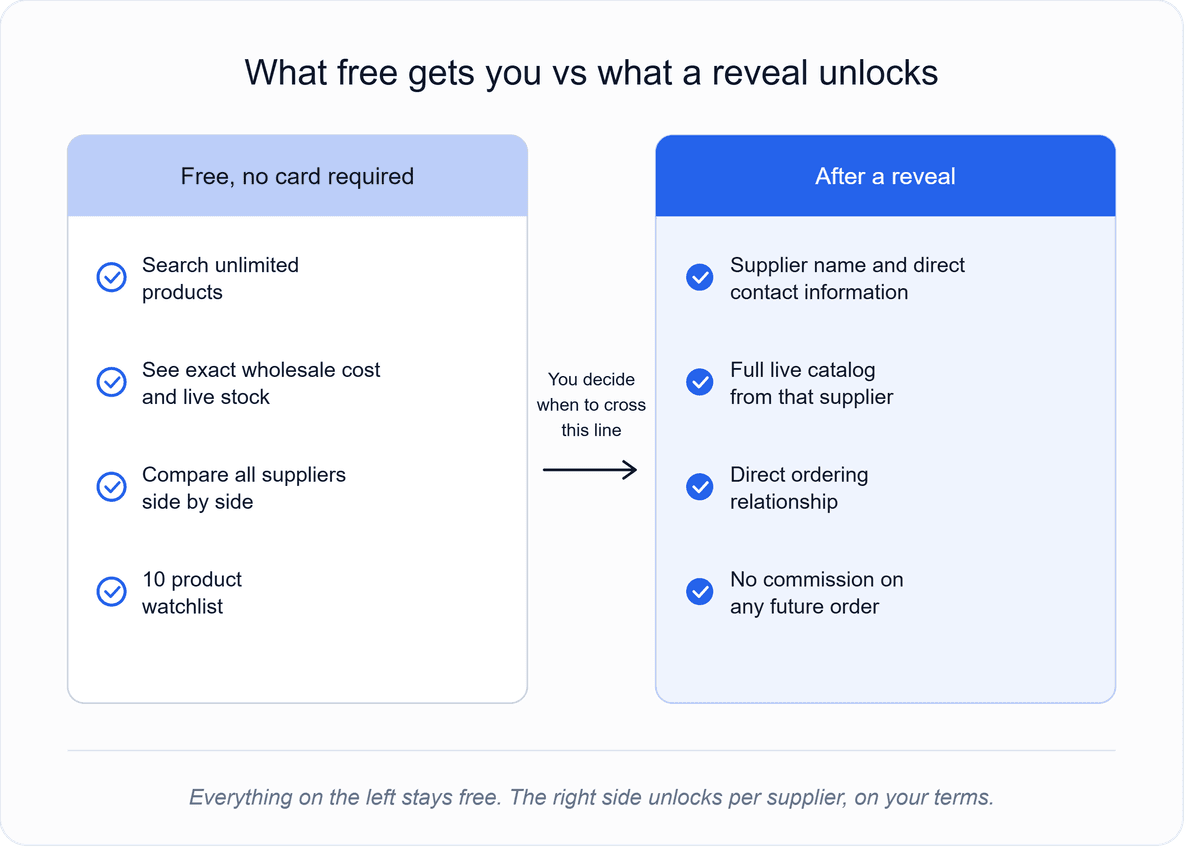
Up to this point, everything is free. Searching, comparing, and seeing the exact wholesale cost and live-stock across every distributor for a product—none of that requires paying anything. The decision point comes when you find a supplier worth actually contacting, and that's when revealing their identity and contact information becomes a paid action.
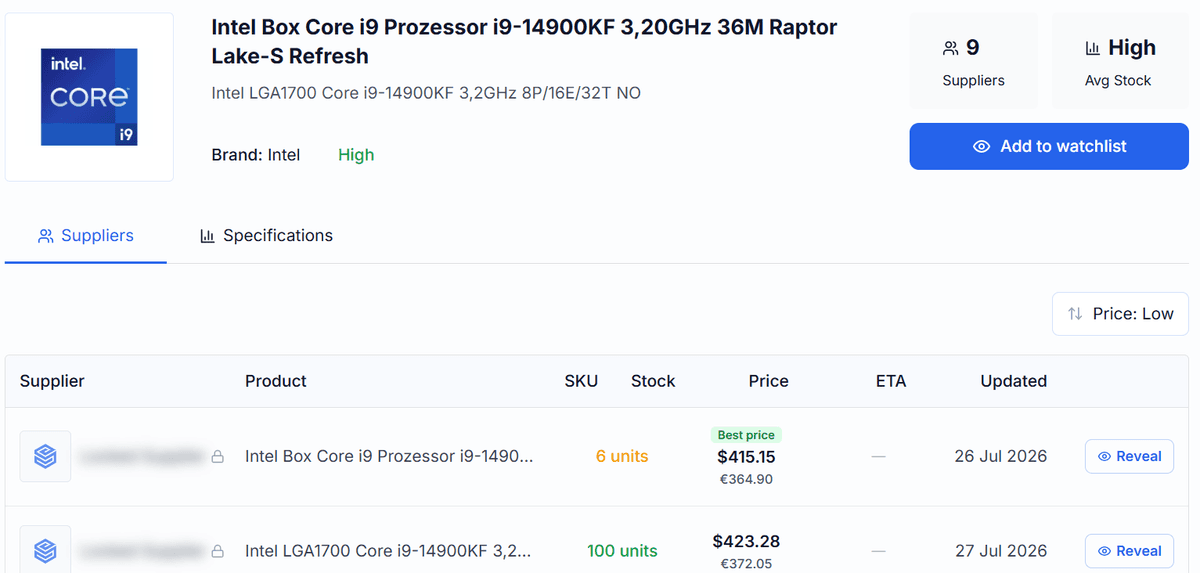
This structure exists for a specific reason. It means you're never paying to browse. You're only paying at the exact moment you've already decided a supplier is worth pursuing, based on real cost and stock data you saw for free. On the Free plan, a single reveal costs 99 dollars, and that amount is credited toward a Basic plan if you upgrade within 30 days.
The Basic plan includes two reveals a month as part of the subscription, with additional reveals available at a lower per-reveal rate than paying one at a time. Once a supplier is revealed, they're yours permanently. Canceling a subscription later does not take away suppliers you've already unlocked.
There's also a protection built into this step that's worth knowing about before you reveal anyone. If a revealed supplier's feed goes stale within 60 days of the reveal, meaning the data quality that justified paying for the contact turns out not to hold up, the credit for that reveal is refunded automatically. You're not stuck having paid for a contact that turns out to be unreliable.
Step 5: Connect and Order Directly — No Commission, No Middleman
Once a supplier is revealed, the platform's role in that specific relationship is essentially finished. You have their contact information, and their full live catalog opens in your dashboard. From that point forward, ordering happens directly between you and the supplier, the same way it would if you'd found them any other way. There's no commission taken on orders, no broker sitting between you and the distributor, and no ongoing fee tied to that relationship beyond what you already paid to reveal it.
-1200x624.png&w=3840&q=75)
This matters because it changes what you're actually paying for. You're not paying for access to a marketplace or a percentage of your future orders. You're paying, once, for the introduction and the verified data that got you there. Everything after that is a normal supplier relationship that you manage the same way you'd manage any other one — which is where testing a supplier's reliability once you're in contact and onboarding the relationship once you've connected become the next steps.
How B2B Supplier Hub Verifies Every Supplier
None of the steps above would mean much if the suppliers behind them weren't real. Before a supplier's listings go live on the platform at all, their credentials and catalog data go through a human review, not just an automated check. This is meant to prevent the problem that plagues a lot of supplier directories, where listings exist that are outdated, misrepresented, or simply fake, and a buyer only finds out after they've already spent time reaching out.
The live feed system extends this same idea past the initial verification. Rather than treating a supplier's data as accurate forever once it's been checked once, every listing tracks when it was last confirmed, and a feed that goes stale gets flagged rather than silently continuing to display old numbers as if they were current. This matters more than it might sound like at first.
A wholesale price sheet from three months ago can be meaningfully wrong today, since distributors adjust pricing, run out of stock, or lose authorization on specific SKUs regularly. A comparison built on stale numbers isn't actually a comparison; it's a guess dressed up as data. Flagging staleness before you act on it is what keeps the search-and-compare steps genuinely useful, rather than just another directory that looks current but isn't.
This is also the thinking behind why new distributors are added to the network on an ongoing basis rather than as a one-time catalog build. Each new verified distributor expands what's searchable the moment they go live, which means the platform's usefulness compounds over time rather than staying static.
Which Plan Is Right for You? Free vs. Basic ($99/mo) vs. Pro ($249/mo)
The three plans are built around how often you expect to reveal new suppliers, not around how much you search, since searching and comparing are free on every plan.
The Free plan makes sense if you're still evaluating whether this fits how you source or if you only have one or two suppliers you're seriously considering right now. You get full search and comparison access with no card required, and a single reveal if you find something worth pursuing costs 99 dollars, credited toward Basic if you decide to upgrade within a month.
The Basic plan fits sellers who are actively building out supplier relationships on an ongoing basis. Two reveals a month are included; every revealed supplier stays yours permanently even if you later cancel. Additional reveals beyond the two included cost less per reveal than paying one off on the free plan.
The Pro plan is built for sellers scaling a broader supplier bench across many SKUs at once, with six reveals a month, a larger watchlist for tracking price and restock alerts across more products, and priority support.
How to Get Started With B2B Supplier Hub (Free, No Card Required)
If you've read this far, the most useful next step is simply creating your free account and running your first real search. Pick a product you're already sourcing, or one you're considering adding, and see what comes back. Signing up, searching, and comparing cost nothing, and there's no card required to start. Click "Start Free" at b2bsupplierhub.com, log in, and try your first search right now—or explore the homepage first to see the full picture of how the platform works before diving in.
Frequently asked questions
01Is it free to search for suppliers on B2B Supplier Hub?
02Do I need an account to search?
03How much does it cost to reveal a supplier's contact information?
04Do I keep access to a supplier if I cancel my subscription?
05Does B2B Supplier Hub take a commission on orders I place with suppliers?
06What happens if a supplier's information turns out to be outdated after I reveal them?
The B2B SupplierHub Team
Wholesale & sourcing
Stop hunting suppliers by hand. Type a UPC instead.
B2B Supplier Hub shows the suppliers in our network carrying a product on one page: wholesale cost, stock, and retail price side by side. Free to search, no card required.