
Sourcing
6 Seller Assistant Alternatives for Wholesale Sellers (2026)
-1200x627.png&w=3840&q=75)
6 Seller Assistant Alternatives for Wholesale Sellers (2026)
Seller Assistant has earned its place in the wholesale seller's toolkit. Its Chrome extension puts BSR, sales estimates, offer counts, profitability math, IP alerts, and restriction checks directly on Amazon product pages, and its platform layer adds bulk price list analysis, brand research, and purchase order management on top. For analyzing whether a product is worth selling, it does the job it advertises.
But "Is this product worth selling?" is only half of wholesale sourcing. The other half is "Who will actually sell it to me, at what cost, and do they have stock?" And that second question is where sellers start shopping for alternatives, along with the usual reasons: some want deeper bulk scanning, some want brand-level market maps, some want something lighter and cheaper, and some want the supplier side that no analysis extension provides. Here are six alternatives, compared honestly by what each one actually does best, including where Seller Assistant remains the stronger choice.
1. B2B Supplier Hub: For Finding the Distributors Themselves
Full disclosure first: this is our platform, so judge this entry with that in mind. We've included it because it addresses the gap sellers most often describe when they search for Seller Assistant alternatives, which is that analysis tools tell you a product is good but not where to buy it.
B2B Supplier Hub is a verified distributor network, not an analysis extension. Search any product by UPC, MPN, name, or brand, and you see every distributor in the network carrying it, with the exact wholesale cost, live stock depth, the retail price, and the date each listing was last verified.
Supplier identities stay masked until you choose to reveal one, and the numbers themselves are free without limits, which you can read more about in what the free tier includes. The workflow it replaces isn't the extension on a product page; it's the weeks of googling, emailing, and directory-digging between "this product is profitable" and "I have a supplier for it."
Where Seller Assistant is stronger: on-page product analysis, IP alerts, restriction checking, and bulk price list scanning. B2B Supplier Hub doesn't do those jobs, and the honest setup for a wholesale seller is analysis from a tool built for analysis and supplier discovery from a network built for suppliers. Where B2B Supplier Hub is stronger: it holds actual distributor cost and stock data, which no extension can display because no extension has them.
2. SmartScout: For Top-Down Brand and Market Research
SmartScout approaches sourcing from the opposite direction of Seller Assistant. Instead of starting from a product page, it starts from a database of the Amazon marketplace itself: brands, sellers, and categories you can slice by revenue, seller count, Buy Box behavior, and dozens of other filters.
Wholesale sellers use it to answer questions like "which brands in this category do enough revenue, with few enough sellers, to be worth pitching for an account?" That makes SmartScout the strongest tool on this list for prospecting new brands to open, and its market-map view suits sellers who think like analysts.
The tradeoffs are the mirror image: it's a heavier, pricier platform with a real learning curve, and it's overkill if your question is simply whether one specific deal is profitable. Many wholesale operations run SmartScout for brand discovery alongside a lighter checker for daily deal review rather than treating it as a full replacement.
3. SellerAmp SAS: For Fast, Cheap Product-Level Checks
SellerAmp is the lightweight option: a Chrome extension and mobile app built to answer one question quickly, which is whether a specific ASIN is worth reselling. It shows ROI, margin, fees, rank history via Keepa integration, and alert flags for gating, hazmat, and IP risk, and it covers multiple Amazon marketplaces with a VAT calculator that makes it a favorite among UK and EU sellers.
Against Seller Assistant, SellerAmp trades breadth for speed and price. It has no purchase order module, no supplier database, and lighter bulk capability, but it's simpler to learn, mobile-ready for in-store scanning, and generally cheaper at entry.
If your operation is one person checking deals fast rather than a team running a full sourcing pipeline, SellerAmp covers the core at lower cost. If you need the workflow layer, Seller Assistant keeps the edge.
4. Scan Unlimited: For High-Volume Price List Scanning
Scan Unlimited is a specialist. It does one job, bulk scanning wholesale supplier price lists against Amazon data, and builds everything around it: upload a distributor's sheet, match thousands of line items to ASINs, and filter the results down to the handful worth buying.
Seller Assistant's own Price List Analyzer competes directly here, so the comparison is genuinely close and comes down to how central list scanning is to your operation.
Sellers who process many large price sheets weekly often prefer a dedicated scanner's throughput and matching depth, while sellers who scan occasionally are usually better served keeping it inside a broader platform they already pay for. If the price list is your primary sourcing input, test both on the same sheet and let the match rate decide.
5. Analyzer.Tools: For Spreadsheet-First Sellers at Scale
Analyzer.Tools sits in the same bulk-scanning territory as Scan Unlimited and pushes hardest on speed and filter depth, advertising scans of very large lists with seventy-plus filterable data points per product. It suits sellers whose sourcing lives in spreadsheets: reverse-sourcing exports, distributor catalogs, and mixed lists that need heavy filtering before a human ever looks at them.
The tradeoff pattern matches Scan Unlimited's: this is a scanning engine, not a workflow platform, so the on-page research, IP alerts, and order management that Seller Assistant bundles aren't the point here. Choose it when raw list-processing capacity is the bottleneck in your operation, and pair it with whatever handles your page-level checks.
6. Tactical Arbitrage: For Automated Cross-Site Sourcing
Tactical Arbitrage automates the discovery step itself. Rather than analyzing products you found, it scans retail and supplier sites against Amazon to surface profitable gaps for you, with a wholesale module for matching uploaded lists.
It built its reputation in online arbitrage, and that remains its center of gravity, but wholesale sellers use the list-matching side as well. At the time of writing, it is sold as part of a broader bundled suite of seller tools, so evaluate the current packaging when you compare.
Against Seller Assistant, the difference is philosophy: Seller Assistant helps you judge deals you bring to it, while Tactical Arbitrage goes looking for deals on its own. Automation-first discovery suits sellers with more capital than sourcing hours, at the cost of a steeper setup and results that still need human vetting before money moves.
How to Actually Choose
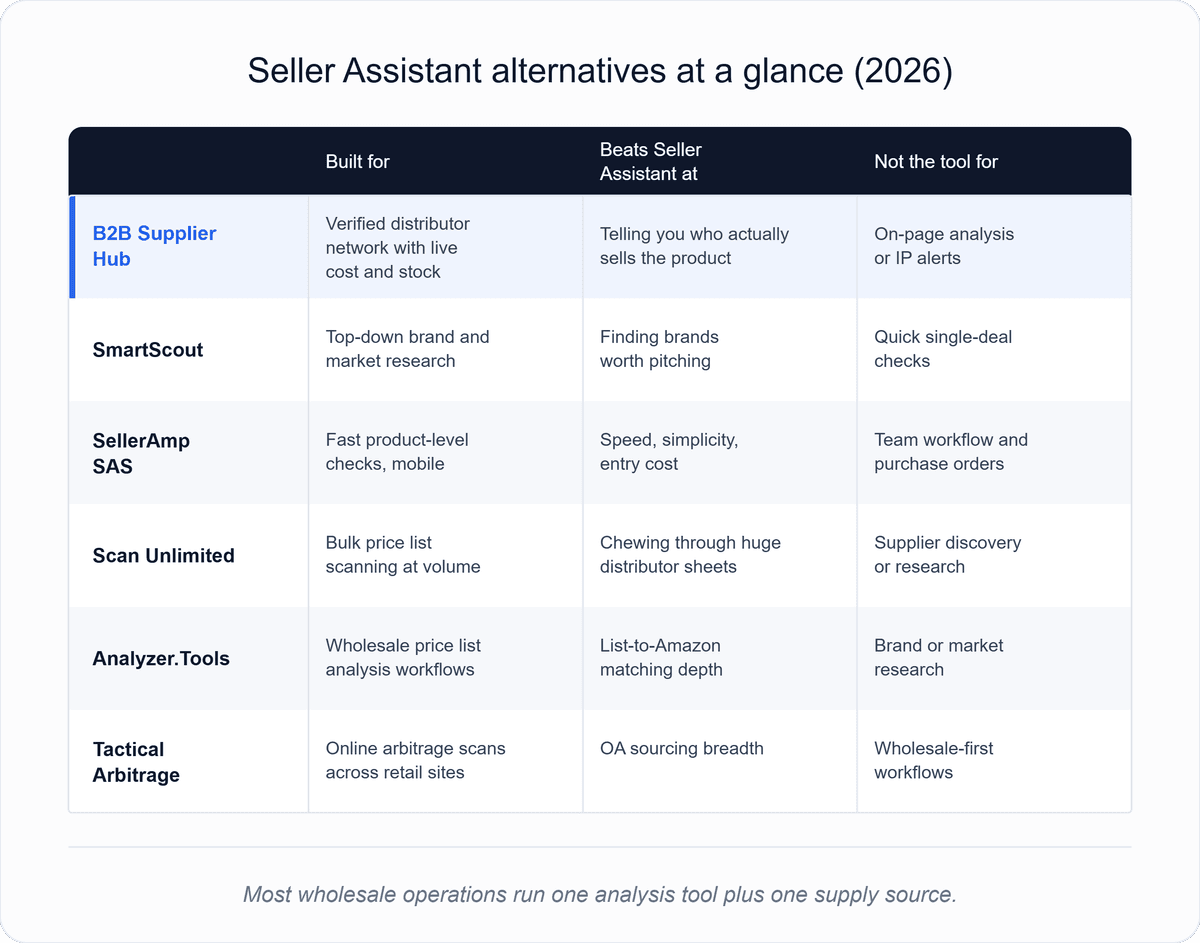
Strip the feature lists away, and the decision usually reduces to which bottleneck is really slowing your sourcing if it's judging individual deals: SellerAmp or Seller Assistant itself. Suppose it's processing supplier sheets: Scan Unlimited or Analyzer.Tools. If it's finding brands worth pitching, SmartScout.
Suppose it's discovery hours: Tactical Arbitrage. And if it's the supplier question itself, knowing who carries a product, at what cost, and with what stock—that's the gap B2B Supplier Hub exists to close.
Most serious wholesale operations end up with two tools, one for analysis and one for supply, because those are genuinely different jobs. Whichever analysis tool you pick, the supplier data it can't see is the same.
The Supplier Side Is Free to Check
Every tool in this list, Seller Assistant included, ultimately feeds the same moment: you've confirmed a product is worth selling, and now you need someone to sell it to you. B2B Supplier Hub answers that moment directly.
Search the product; see every verified distributor carrying it with exact cost, live stock, and verification dates; and reveal the one whose numbers clear your math. The research side costs nothing and has no search limit, so it fits alongside whichever analysis tool you keep. Run your next confirmed product through it and see who's actually holding the inventory.
Frequently asked questions
01What is the best Seller Assistant alternative for wholesale sellers?
02Is there a free alternative to Seller Assistant?
03Do I still need an analysis tool if I use a supplier network?
04Which alternative is best for scanning distributor price lists?
The B2B SupplierHub Team
Wholesale & sourcing
Stop hunting suppliers by hand. Type a UPC instead.
B2B Supplier Hub shows the suppliers in our network carrying a product on one page: wholesale cost, stock, and retail price side by side. Free to search, no card required.