
Amazon Ungating
Analyzer.Tools Review & 4 Alternatives for Reverse Sourcing (2026)
Reverse sourcing has become the default wholesale strategy for good reason: instead of guessing which products might sell, you start from products already selling on Amazon and work backward to whoever supplies them. The catch is that the "work backward" half is where most tools quietly stop helping.
Analyzer.Tools is one of the better-known names sellers reach for here, and it markets a Browser Scan feature explicitly built for the reverse sourcing method. This review covers what it genuinely does well, where its limits sit, and four alternatives worth comparing, including where each one is the better pick.
One note on sources before we start: a lot of the critical Analyzer.Tools commentary online is published by directly competing tools, so this review sticks to what the company itself documents and flags opinion as opinion.
What Analyzer.Tools Actually Is
Analyzer.Tools is a bulk analysis and profit calculation platform aimed at professional Amazon sellers working with large supplier price lists. The core workflow is spreadsheet-in, decisions-out: you upload a distributor or brand catalog, the platform matches line items to Amazon listings, and it returns profitability math and demand signals across the whole sheet so you can filter thousands of rows down to the few worth buying.
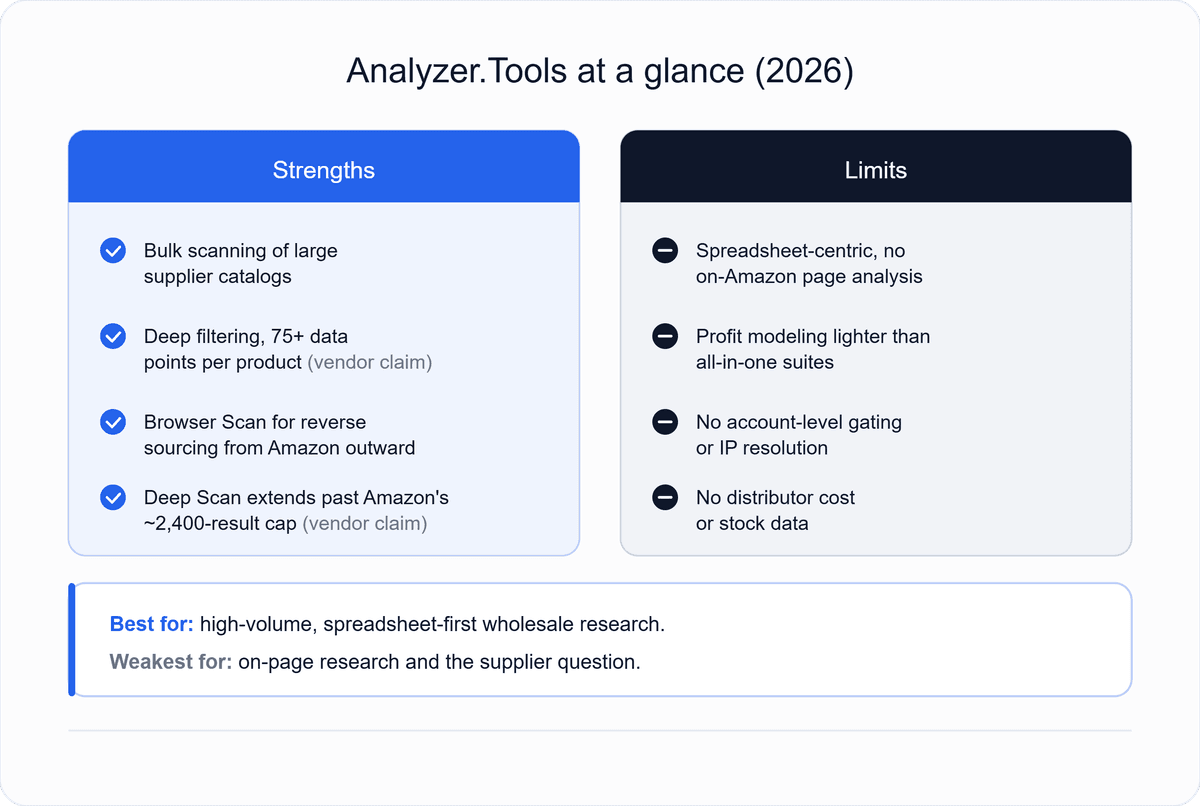
Its published feature set includes bulk scanning of large catalogs, up to 75-plus data points per product by the company's own claim, historical pricing and BSR context, proprietary sales estimates, extensive filtering and sorting, brand block lists, and favorites lists for later review.
Three features go beyond plain list scanning and are worth knowing by name. Browser Scan is the reverse sourcing feature: you browse Amazon's catalog in your own browser and pull products directly into the platform for analysis, which lets you source from Amazon outward rather than only from a supplier sheet inward.
Competing Seller Search pulls a rival seller's storefront into the tool so you can analyze what they're selling. And Deep Scan addresses a real Amazon constraint, since storefront and browser searches cap out around 2,400 visible results; the company states Deep Scan can extract up to 100,000.
What It Does Well
Bulk throughput is the headline strength. If your sourcing input is large supplier catalogs, the platform is built precisely for that shape of work, and sellers consistently describe the time saved on sheets running into thousands of lines as the main reason they pay for it.
Filter depth is the second. With dozens of data points per SKU and sorting across nearly all of them, you can build tight screens that cut a catalog to a shortlist without opening a single Amazon tab. For a spreadsheet-first operation, that's the whole job.
The reverse sourcing angle is the third, and it's the reason this tool comes up in wholesale conversations more than pure list scanners do. Browser Scan plus Competing Seller Search plus Deep Scan is a genuine research loop for finding products worth chasing, not just evaluating products someone already handed you.
Where It Falls Short
The recurring limitation, and the one that matters most to wholesale sellers, is the Analyzer.Tools is spreadsheet-centric rather than integrated into Amazon's pages themselves.
There's no on-page analysis layer while you browse Amazon normally, so research happens in the platform rather than in the flow of looking at listings. Whether that's a drawback depends entirely on how you work: spreadsheet-first sellers often prefer it, while sellers who research listing by listing will feel the friction.
Profit modeling is functional but not exhaustive; sellers needing tax handling or break-even modeling built in typically layer another tool on top. Compliance and risk checking is the more consequential gap for wholesale, since gating and IP restrictions are decided per account and are not something this platform resolves for you.
That check still belongs in Seller Central, and our guide on how to check if a brand is gated on Amazon covers the free first-party methods.
And the largest gap is the one shared by every tool in this category, including its alternatives: none of them tell you who will actually sell you the product. Analyzer.Tools can prove a product is worth buying at a given cost. It cannot tell you which distributor carries it, what they charge, or whether they have stock. That's a different dataset entirely.
Who Analyzer.Tools Is Right For
It fits sellers whose bottleneck is processing volume: large catalogs, mixed lists, multiple suppliers, and a preference for working in filtered data rather than browsing listings. It fits reverse sourcing workflows specifically, given Browser Scan and Deep Scan.
It fits less well if you're a beginner wanting one simple tool, if your research happens primarily on Amazon product pages, or if your real problem isn't analyzing products but finding suppliers for the products you've already validated.
4 Alternatives for Reverse Sourcing
1. B2B Supplier Hub: For the Half Analyzer.Tools Doesn't Cover**
Disclosure: this is our platform, so weigh this entry accordingly. It's here because it addresses the specific gap named above rather than competing on scanning.
Reverse sourcing has two halves. Analyzer.Tools handles the first: find products already selling and confirm the economics. B2B Supplier Hub handles the second: search any product by UPC, MPN, name, or brand and see every verified distributor in the network carrying it, with exact wholesale cost, live stock depth, retail price, and the date each listing was verified.
Supplier identities stay masked until you choose to reveal one, and the numbers are free with no search limit.
Where Analyzer.Tools is stronger: Everything analytical. Bulk catalog scanning, filtering, historical BSR and pricing, and sales estimates. We don't do those, and a serious operation runs an analysis tool alongside a supply source rather than expecting either to be both.
Where B2B Supplier Hub is stronger: It holds actual distributor costs and stock data, which no scanning platform can display because none of them have it.
2. Scan Unlimited: The Closest Direct Substitute
Scan Unlimited occupies nearly the same territory: upload wholesale price lists, match them against Amazon data, calculate profitability and demand, and filter aggressively. If you use Analyzer.Tools for purely list scanning; this is the most like-for-like swap on the list, and the comparison usually comes down to match rate on your actual supplier files, interface preference, and current pricing.
What it doesn't replicate is the reverse sourcing loop. Browser Scan and Competing Seller Search are Analyzer.Tools' differentiators, so if those are why you're using it, a straight list scanner is a downgrade rather than a substitute. Test both on the same real price sheet before switching.
3. SmartScout: For Reverse Sourcing That Starts at the Brand Level
SmartScout inverts the starting point. Rather than pulling individual products from Amazon into a spreadsheet, it maps the marketplace itself: brands, sellers, and categories filterable by revenue, seller counts, and Buy Box behavior. For wholesale, that answers a different and often earlier question, which is which brands are worth approaching for an account in the first place.
Use it when your reverse sourcing is strategic, at the brand and category level, rather than product by product. It's a heavier and pricier platform with a real learning curve, and it doesn't replace bulk price list scanning, so many operations run something like SmartScout for prospecting and a scanner for the sheets.
4. Seller Assistant: For On-Page Research Alongside Bulk Work
Seller Assistant is the natural alternative for sellers who find the spreadsheet-only workflow limiting. It layers analysis directly onto Amazon pages, showing BSR, sales estimates, offer counts, profit math, IP alerts, and restriction checks while you browse, and it adds its own bulk price list analyzer plus brand research and order management on the platform side.
Against Analyzer.Tools, the tradeoff is breadth and on-page presence versus raw scanning focus. Sellers who research listing by listing generally prefer it; sellers whose day is spent inside large catalogs may find the scanning side less central to its design. We cover it in more depth in our roundup of Seller Assistant alternatives for wholesale sellers.
How to Choose
The honest decision rule is to name your bottleneck first. If it's processing large supplier catalogs, Analyzer.Tools or Scan Unlimited. If it's researching listings as you browse, it's Seller Assistant. If it's deciding which brands to chase, SmartScout. If it's finding the distributor for products you've already validated, that's the supply side, and it's what B2B Supplier Hub was built for.
Most wholesale operations end up running two tools, because analysis and supply are genuinely different datasets. Whichever analyzer you keep, the supplier-side numbers it can't show you are the ones our guide to evaluating a supplier from the numbers alone teaches you to read, and the reverse sourcing workflow end to end shows where each half fits.
Finish the Reverse Sourcing Loop
Analyzer.Tools can take you from Amazon's catalog to a shortlist of products worth selling. The step after that, finding someone who will actually sell them to you, is where the loop usually stalls into weeks of googling and cold emails.
B2B Supplier Hub closes it: search a validated product by UPC or brand and see every verified distributor carrying it, with exact wholesale cost, live stock, and verification dates, free and unlimited. Take your next shortlist from whatever analyzer you use, run it through the search, and see who's holding the inventory.
Frequently asked questions
01Is Analyzer.Tools good for reverse sourcing?
02What is the best Analyzer.Tools alternative?
03Does Analyzer.Tools show who supplies a product?
04Do I need both an analysis tool and a supplier tool?
The B2B SupplierHub Team
Wholesale & sourcing
Stop hunting suppliers by hand. Type a UPC instead.
B2B Supplier Hub shows the suppliers in our network carrying a product on one page: wholesale cost, stock, and retail price side by side. Free to search, no card required.