
B2B Supplier Hub
B2B Supplier Hub Chrome Extension: Find Suppliers on Amazon
-1200x627.png&w=3840&q=75)
Product research on Amazon usually works like this: you find an interesting listing, copy the title or barcode, open a new tab, and start searching for who might supply it. Then you do it again for the next product, and the next. It's not hard work, but it's slow work, and it interrupts you every single time.
The B2B Supplier Hub Chrome extension removes that loop entirely. Install it, browse Amazon the way you already do, and the moment you land on a product page, a small card appears showing how many verified suppliers in our network carry that exact item, the lowest wholesale price, and whether it's in stock. No copying, no tab switching, no searching by hand. The sourcing answer comes to you, on the page where the question came up.
Here's what it does, how it works, and what it deliberately doesn't do.
What the Extension Shows on Every Amazon Product Page
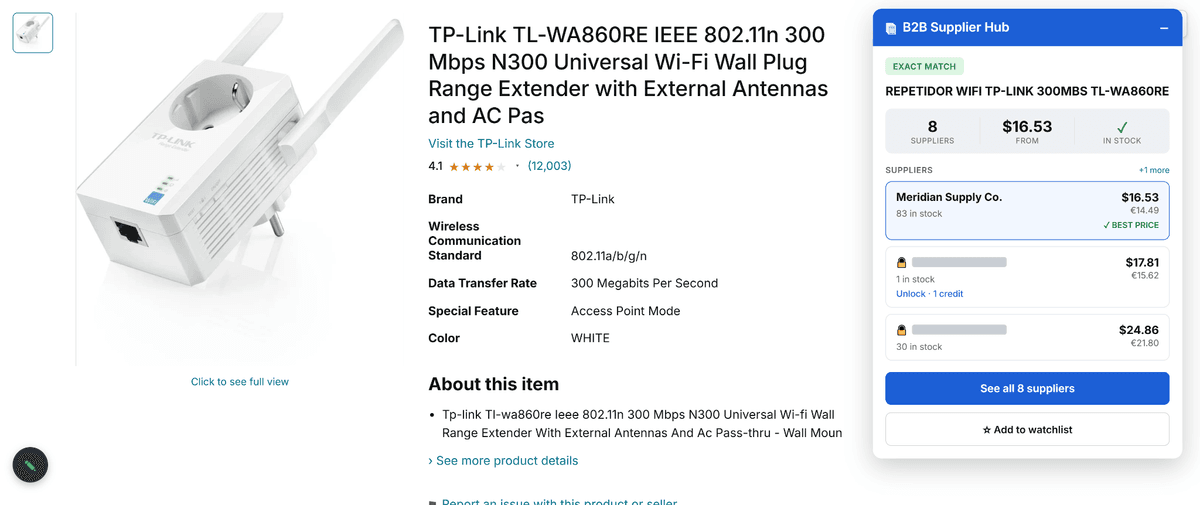
As soon as an Amazon product page loads, the extension reads the item's identifiers, the ASIN, title, brand, and barcode, plus the manufacturer part number where one exists. It matches those against the B2B Supplier Hub catalog and renders a compact card over the page with three things:
- Supplier count. How many verified suppliers in our network carry this exact product?
- Lowest wholesale price. The best price available across those suppliers, so you know the floor immediately.
- Stock status. Whether the product is actually available right now, because a great price on an out-of-stock item is not a deal.
Below that summary, the card lists the individual supplier offers ranked by price, cheapest first, each showing its wholesale price and current stock. The cheapest in-stock offer is tagged as the best price automatically, so the sharpest deal is obvious before you've read a single row.
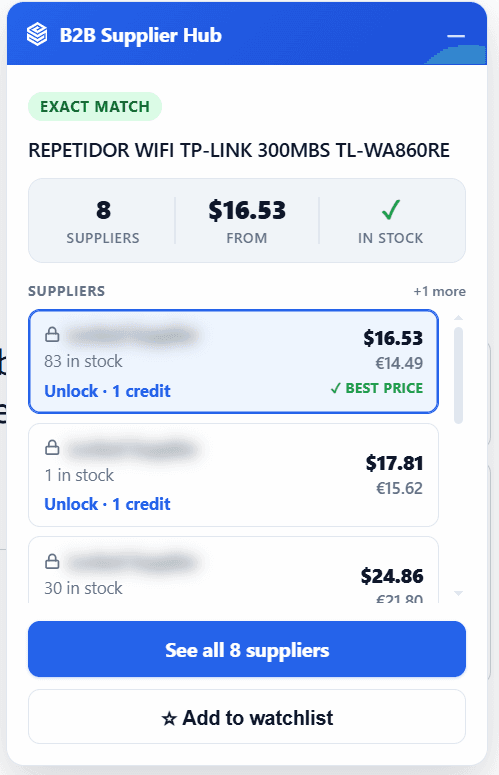
The same card also lives behind the toolbar icon, kept in sync with the on-page version. Minimize the card while you browse, then reopen it from the toolbar whenever you want it back.
Is the Chrome Extension Free? (Free to Look, One Credit to Unlock)
If you've read how B2B Supplier Hub works, the extension follows exactly the same rule. The numbers are open: supplier counts, prices, and stock are the research value, and you see them without spending anything. What stays private is who each supplier is.
When one offer is clearly worth pursuing, you click Unlock on that row. It spends one reveal credit from your plan, the supplier's identity opens up, and it's saved to your account permanently. The same supplier is never charged twice, on the extension or on the platform, because a revealed supplier is yours for good, even if you cancel later.
If you're signed in without an active plan, the card still shows you the summary, and a short upgrade prompt takes the place of the individual offers. You always see what's there before deciding whether it's worth paying to go further.
The extension signs in with your existing B2B Supplier Hub account, so credits, revealed suppliers, and watchlists stay in one place across both.
Add Products to Your Watchlist Without Leaving Amazon
Sourcing decisions don't always happen the day you find a product. The card includes an Add to Watchlist button, so you can save an item straight from the Amazon page and get alerted when its price or stock changes, the same watchlist you already have on the platform, fed from wherever you happen to be browsing.
Privacy: What the Extension Reads (and What It Never Tracks)
Browser extensions ask for trust, so it's worth being plain about how narrow this one is.
It runs only on Amazon product pages, currently amazon.com, amazon.co.uk, and amazon.de. It reads the visible product details on those pages to identify the item, and it talks only to the B2B Supplier Hub service over a secure connection.
It does not track your browsing anywhere else on the web. It does not read pages outside Amazon product listings. It does not ask for more permissions than it uses, and it does not store card details or passwords. It reads the product page in front of you and nothing more.
Supported Categories, Marketplaces, and Limitations
Two things to know before you install. First, the extension matches products against our network, which currently covers Electronics, Sports & Outdoors, and Tools & Home Improvement.
Products outside those categories, or items no supplier in the network carries yet, won't return matches, and the network grows as new verified distributors join. For products the network doesn't cover yet, the manual routes in our guide to finding wholesale suppliers for Amazon FBA still work. Second, it's Chrome-only for now, and it works on the three Amazon marketplaces listed above.
How to Install the B2B Supplier Hub Chrome Extension
Install the extension from the Chrome Web Store, then do the one thing that shows you its value fastest. Open the Amazon page of a product you already sell. Within a second, you'll know how many suppliers carry it, what the floor price is, and whether it's in stock, information that used to be a research session, now sitting quietly on the page. It's the same flow as our reverse sourcing walkthrough on the platform—just without leaving Amazon.
And if you haven't tried the platform itself yet, searching is free at b2bsupplierhub.com, no card required.
Frequently asked questions
01Is the extension free?
02Which sites does it work on?
03Does it track my browsing?
04Do reveals made in the extension carry over to the platform?
05What if a product shows no suppliers?
The B2B SupplierHub Team
Wholesale & sourcing
Stop hunting suppliers by hand. Type a UPC instead.
B2B Supplier Hub shows the suppliers in our network carrying a product on one page: wholesale cost, stock, and retail price side by side. Free to search, no card required.