
Sourcing
UPC, EAN, ASIN, MPN Explained: A Reseller's Guide (2026)
-1200x627.png&w=3840&q=75)
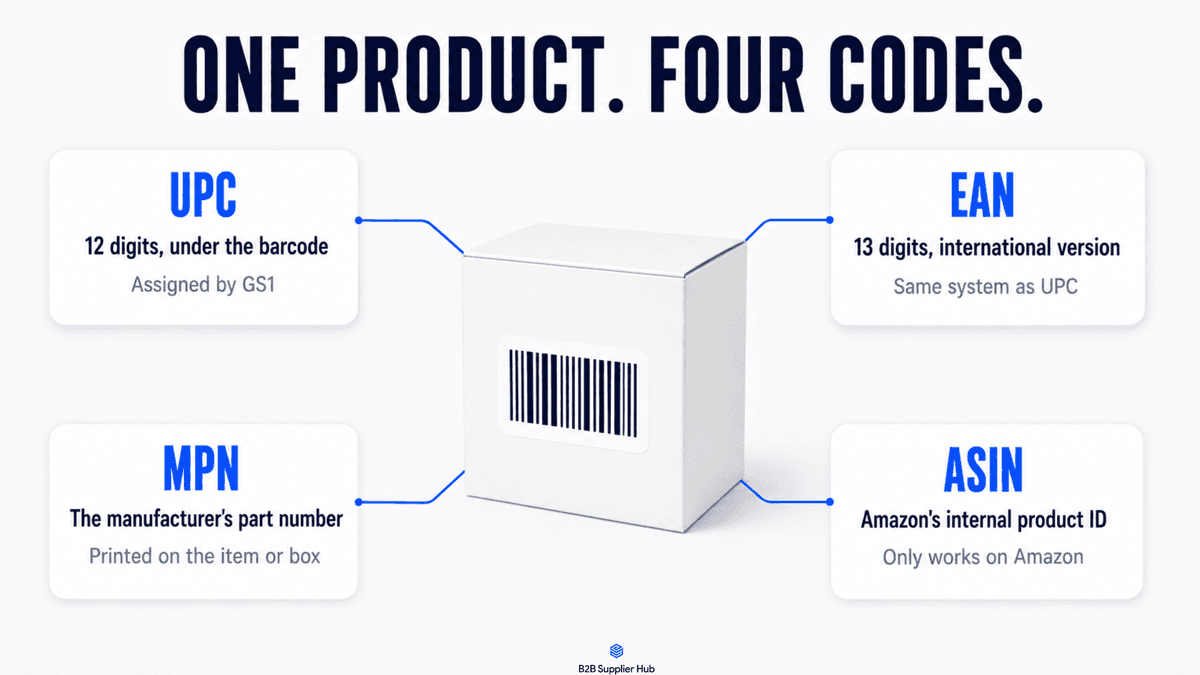
Pick up any product you sell and look closely. It's carrying at least four different codes. There's one printed under the barcode, one on its Amazon listing, one in the manufacturer's catalog, and one on your distributor's price list. And here's the annoying part: they don't match each other.
Most resellers learn what these codes mean the expensive way, usually after ordering the wrong item or spending an hour failing to match a listing to a price list. So, let's just learn it the cheap way instead. Here's what each code actually is, who created it, and how to use them when you're sourcing.
What Is a UPC? The 12-Digit Number Under the Barcode
A UPC is the 12-digit number printed under a product's barcode, used across North America.
Every brand gets its codes from an organization called GS1, and each version of a product gets its own. Different size, different color, different pack count, different UPC. It's the code retail scanners read at checkout, and it's the closest thing a product has to a fingerprint.
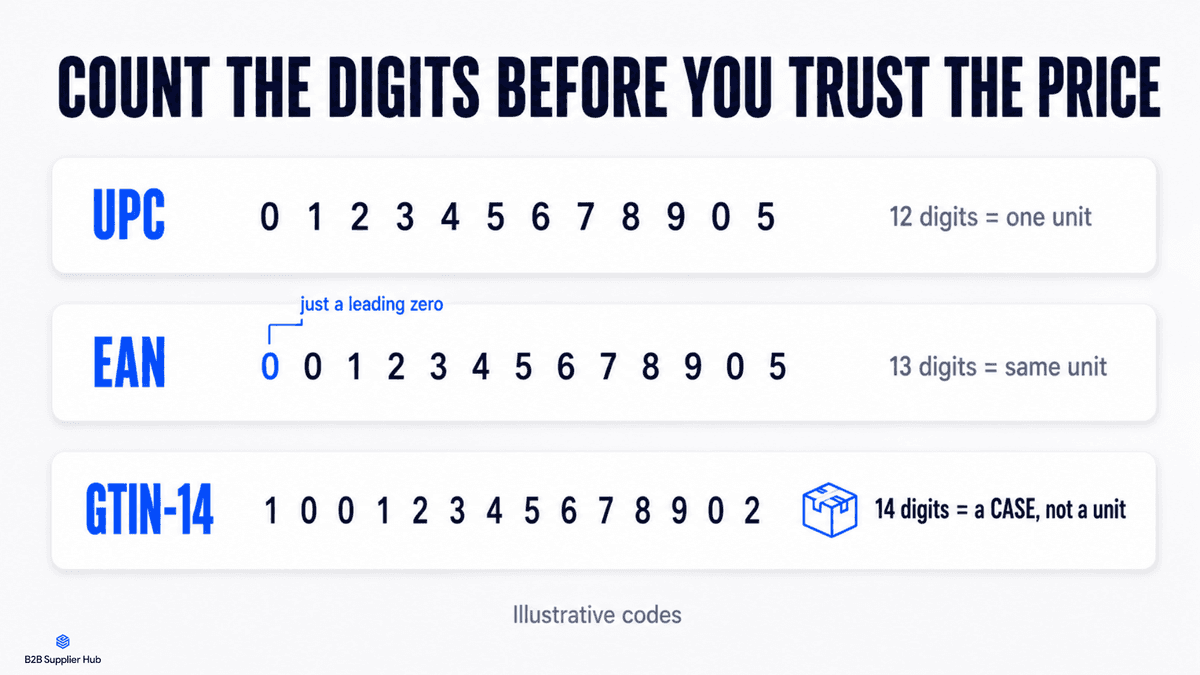
One thing worth knowing early: a UPC can start with a zero. And spreadsheets love deleting leading zeros. So when a UPC "doesn't match" anything, count the digits first. If you're looking at 11 digits, Excel ate the zero, and the code is fine.
What Is an EAN? The Same System, One Digit Longer
An EAN is the 13-digit version of the same system, used almost everywhere outside North America.
Here's the simple relationship: put a zero in front of a UPC and you have its EAN. Same product, same system, two lengths. This is why a European supplier's price list and a US listing can show what look like different codes for the same item, and both are correct. If two codes differ only by a leading zero, you're looking at one product, not two.
What Is an ASIN? Amazon's Private Product Code
An ASIN is Amazon's own product ID. Amazon assigns it, and it means nothing anywhere else.
Type an ASIN into a distributor's system and you'll get a blank stare, because the ASIN only exists inside
Amazon's catalog. What makes it useful is that it's a bridge. Open any listing, scroll to the product details, and you'll usually find the real UPC or EAN sitting right there.
And here's some good news if you're a wholesale reseller: since you're mostly joining listings that already exist, the whole "you need a GTIN to list" problem barely touches you. That requirement matters when someone creates a brand-new listing. Joining an existing one means the codes are already in place.
What Is an MPN? The Manufacturer's Part Number
An MPN is the part number the manufacturer gave the product. Letters and numbers, printed on the item or its box.
It's the product's name in its maker's own language, and for a reseller, it's the backup key. Titles change from seller to seller. UPCs go missing from listings or lose digits in spreadsheets. But the MPN stays the same on the box, in the brand's catalog, and in the supplier's feed. When the same power tool appears under three differently worded listings, the MPN is usually the one thing all three share.
What Is a GTIN? The Umbrella Term (and the Case-Code Trap)
GTIN is the umbrella term marketplaces use for these codes.
A UPC is a GTIN-12. An EAN is a GTIN-13. So when Amazon or Walmart says a listing "requires a GTIN," it's simply asking for the UPC or EAN.
There's one more member of the family that matters a lot in wholesale: the GTIN-14. That's a 14-digit code, and it doesn't identify one unit. It identifies a case. When a distributor's price list shows 14 digits, you're looking at carton-level data, and the price next to it is probably a case price. (Price lists have more traps than this one and reading a distributor's pricing tier sheet is its own skill.) Counting digits sounds silly until it saves you from "buying" one unit that turns out to be twelve.
UPC vs ASIN: What's the Difference?
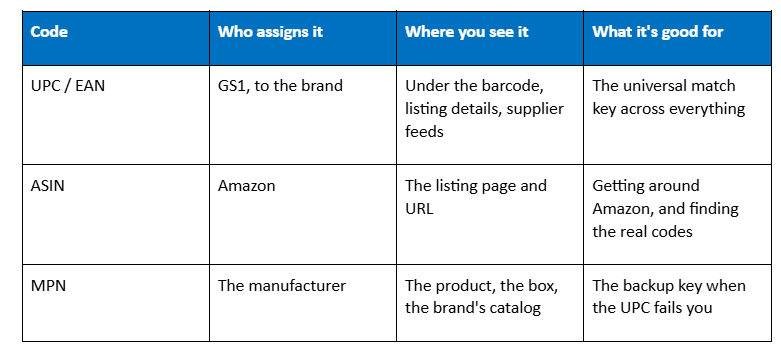
A UPC is a universal 12-digit barcode assigned by GS1 that identifies a product everywhere it's sold; an ASIN is Amazon's own 10-character ID that only exists inside Amazon. Every product with an ASIN usually has a UPC behind it, but not every UPC has an ASIN — that only happens once someone lists it on Amazon. When a distributor's price sheet shows UPCs, you match them to ASINs to see the Amazon listing.
MPN vs EAN: What's the Difference?
An MPN (manufacturer part number) is assigned by the maker to identify a specific model or variant; an EAN is the 13-digit European barcode equivalent of a UPC. The MPN tells you WHICH product it is in the manufacturer's catalog; the EAN tells you it's the same retail unit worldwide. Distributors in Europe list EANs; manufacturers quote MPNs.
ASIN vs EAN
Same relationship as UPC vs ASIN: the EAN is the global barcode, the ASIN is Amazon's internal ID. Amazon usually links the two — paste an EAN into Amazon search and the listing with that EAN comes up.
MPN vs UPC
The MPN comes from the manufacturer and can cover a model family; the UPC comes from GS1 and pins one exact retail unit (size, color, pack count). If you're quoting a distributor, the UPC is the safer identifier; if you're talking to the brand, use the MPN.
How to Convert One Code to Another (UPC → ASIN, ASIN → EAN)
There's no math to convert them—they're linked through the product listing. Paste the UPC or EAN into Amazon's search bar to find the ASIN. Going the other way, the ASIN's listing usually shows the EAN/UPC under product details, or you can search the ASIN in a lookup tool.
How to Use Product Identifiers When Sourcing
Search by code, not by title. The same product's title reads differently across sellers, languages, and marketplaces. Its UPC doesn't. A code search is an exact match. A title search is a guess, and guesses cost time.
Know a unit code from a case code. If a price looks impossibly good, count the digits before celebrating. Fourteen digits means you might be looking at the price of a whole case.
Expect one product to have several valid codes. Multipacks, regional versions, and refreshed packaging each carry their own code. So a search that comes back empty doesn't always mean nobody carries the product. Sometimes it means you searched one variant of it. Try the MPN before you conclude anything.
Matching the product is only step one, of course. Once the right listing and the right suppliers are in front of you, judging a supplier from the numbers alone is the next skill. But none of that starts without the right code.
This is also why any sourcing tool worth using lets you start from whichever code you happen to be holding. On B2B Supplier Hub, the same product is findable by UPC, MPN, or name, and the numbers come back either way.
The five mistakes to stop making today
- Entering your SKU where a GTIN belongs. Your SKU identifies your own inventory record and nothing else on earth. It's a label you made up, and no system outside yours has ever heard of it.
- Searching a case code and expecting unit results. Fourteen digits, remember.
- Letting Excel eat the leading zero. Format the column as text before you paste codes, and this never happens again.
- Assuming an ASIN means anything off Amazon. It doesn't. Find the UPC in the listing details instead.
- Matching products by title when a code was available. Titles lie by accident all the time. Codes don't.
Try it on one product right now
Grab a product you already sell. Find its UPC in the listing details or on the box, and you're holding the fastest possible answer to the question every reseller keeps asking: who else carries this? Working backward from a product to its suppliers is a whole discipline of its own, and our reverse sourcing guide covers it properly, with a real walkthrough on the platform if you'd rather see it than read it.
The codes were always there, printed on everything you sell. Now they're working for you.
Frequently asked questions
01Do I need to buy UPC codes as a reseller?
02Are UPC and EAN the same thing?
03Where do I find a product's UPC if the listing doesn't show it?
04What is a GTIN exemption?
05Is an MPN the same as a serial number?
The B2B SupplierHub Team
Wholesale & sourcing
Stop hunting suppliers by hand. Type a UPC instead.
B2B Supplier Hub shows the suppliers in our network carrying a product on one page: wholesale cost, stock, and retail price side by side. Free to search, no card required.