Free for a limited time: see suppliers and live wholesale cost on any Amazon page with our Chrome extension.

Add to Chrome
Back to blog

Amazon Ungating

How to Get Ungated in Electronics on Amazon (2026 Guide)
The B2B SupplierHub Team8 min read
How to Get Ungated in Electronics on Amazon (Brands + Invoices)

You found an electronics product that sells. You checked it in Seller Central and saw "Apply to sell." You bought from a distributor, uploaded the invoice, and got a rejection with no reason attached. Now you are wondering what you missed.


Most likely, nothing on the paperwork. Getting ungated in electronics on Amazon does not work like grocery or beauty, and most advice is written for those. There is no electronics category approval. You get approved one brand at a time, on your own account, with a paid invoice under 180 days old from a distributor that is authorized for that specific brand. The brand part is where sellers get stuck, and it usually goes wrong before the invoice is ever uploaded.

Is Electronics Gated on Amazon? No Category Gate, Just Brand Gates


Electronics is not on Amazon's list of categories that need approval. Consumer Electronics is open to most sellers, and Personal Computers only needs approval in collectible condition. So where is the wall? Amazon says a gate can sit at five levels: an ASIN, a brand, a brand inside one category, a category, or a sub-category, and that some products need brand approval, no matter what the category allows.


That changes the job. "Ungated in electronics" is not a status you earn once. It is a stack of brand approvals, each decided separately. And since approval is checked against your own account, another seller being approved for a brand tells you nothing about whether you will be.


So check every product before you buy it. Go to Add a Product in Seller Central, search the item, and look at the button next to it. Amazon shows one of three answers. "Sell this product" means you are clear. "Apply to sell" means you are gated and there is an application to complete, and clicking Show limitations tells you what your account specifically needs. "Not Available" means you cannot list it at all.


Our guide to getting ungated on Amazon covers the general process, but we have written a separate blog post on how to check if a brand is gated.


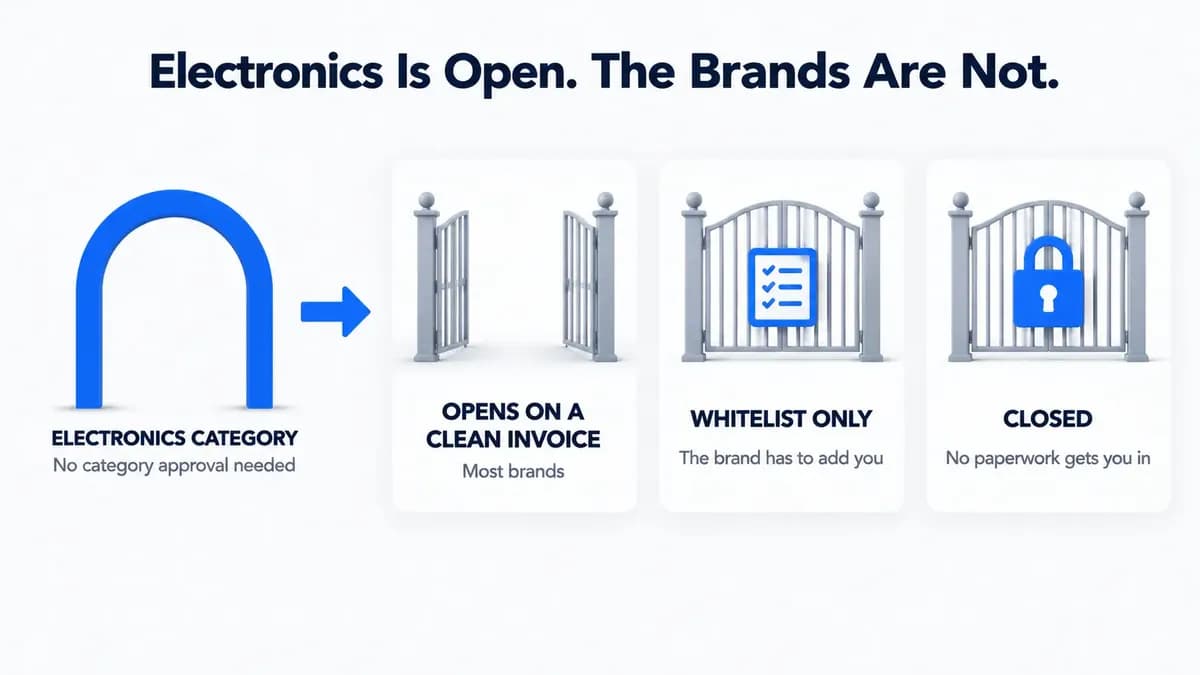
The 3 Types of Electronics Brand Gates (and the One That Never Opens)


The first kind gates the brand but approves on a clean invoice from a real distributor. This is most of them.


The second kind keeps a list of approved sellers. In a recent forum thread, an experienced seller's advice was blunt: ask the brand if it keeps a whitelist on Amazon, and if it does, get your seller name added inside its Brand Registry account. A distributor invoice alone will not get you past it.


The third kind is closed. Amazon staff have said it is possible they are simply not accepting additional sellers for certain brands and products, and some electronics fall under Amazon's separate restricted products policy, which bans items like standalone cylindrical lithium ion battery cells outright. No invoice fixes either one. Do not buy the inventory.


Diagram showing the Amazon electronics category is open to sellers while individual brands sit behind three kinds of gates: open on a clean invoice, whitelist only, and closed.


Why Your Distributor Invoice Gets Rejected for Electronics


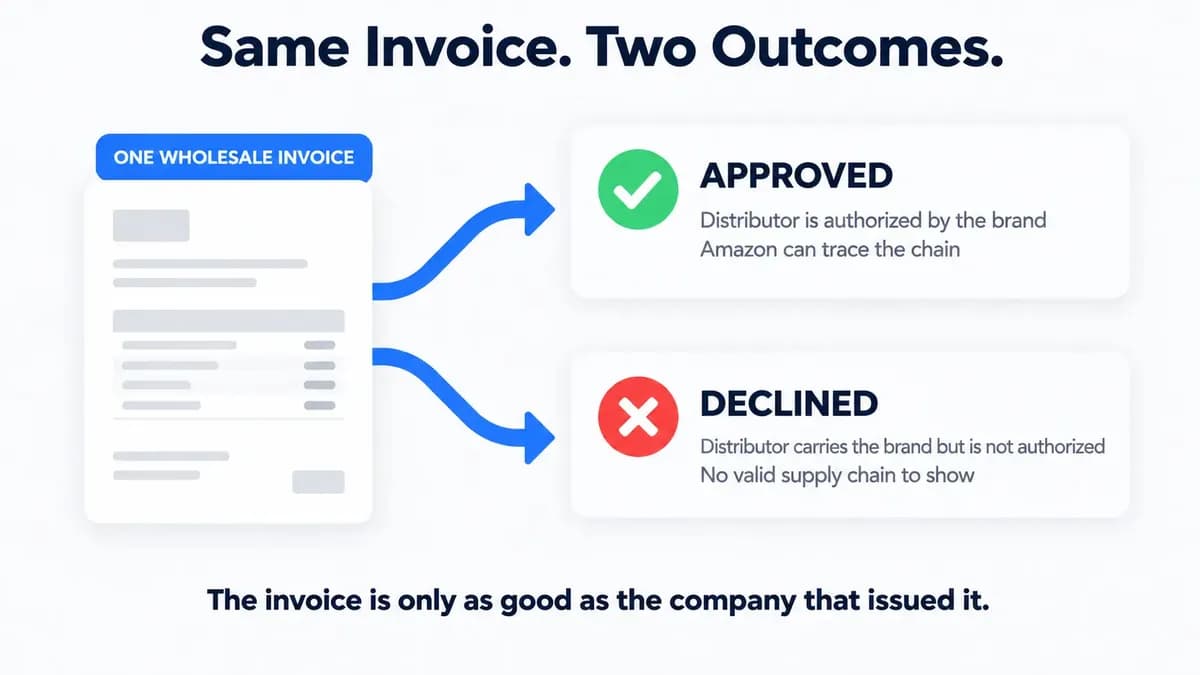
This is the part most guides skip, and it is where most electronics rejections start. A distributor's paperwork can only vouch for what that distributor is actually allowed to sell, and a distributor can carry a brand without being authorized by it. One seller described the same invoice from the same distributor being accepted for three brands and denied for three others. A distributor carrying thousands of brands can be authorized for some and not the rest. Invoices from middlemen fail the same way, even when the product is genuine.


Amazon says the same thing from its side. In an August 2026 thread, a moderator told a seller the application was declined because the documentation did not show a valid supply chain relationship. The seller had bought the units. The problem was the chain behind them.


Diagram showing one wholesale invoice taking two paths, approved when the distributor is authorized by the brand and declined when the distributor only carries the brand.


So the sourcing decision is the ungating decision. Before you apply to anyone, work in this order:

  1. Find out who carries the product and what it costs. You can search any electronics product free on B2B Supplier Hub and see real cost and stock from every verified distributor in our network carrying it, with a freshness timestamp on every listing. If you are already on the Amazon listing, the Chrome extension shows the supplier count and lowest wholesale cost right there.
  2. Shortlist the ones whose numbers clicked. The numbers tell you who carries it and what it costs. Brand authorization is a question you still have to ask.
  3. Ask the distributor if it is authorized for that brand, then ask the brand for its distributor list and see if the name matches.
  4. Buy from the one that clears both, and unlock only that supplier. You pay for a name after you already know the deal works.


The Path That Skips The Invoice Review


Amazon staff say a brand can add you as an authorized reseller inside its Brand Registry account, and if you hold a Letter of Authorization from the brand, you should submit that too. Two things trip sellers here. The letter must come from the brand, since staff have warned that a letter written by your supplier will not be accepted. And sellers report that if it does not mention Amazon specifically, it does not count.


Electronics Invoice Requirements: What Amazon Needs


The published rules are the same everywhere. Amazon staff list them as a purchase invoice from a manufacturer or authorized distributor, dated within the last 180 days, showing your name and address exactly as on your seller account, showing it has been paid, in PDF, DOC, PNG, GIF, or JPG up to 10MB. The full spec is in our invoice requirements guide.


The published rules stop there. From experience, three details reduce back-and-forth on electronics invoices. Get the model number and UPC on each line. List quantities per line, not one total. Use your exact legal entity name, not a trade name. Amazon also asks for product images showing all sides, including labeling, so photograph the box label with the model number visible.


On the ten unit rule you have read everywhere: Amazon's published requirements include no unit count at all. It is an industry habit that works as a practical floor. But some brands ask for far more. Sellers have reported a brand requiring an invoice for 100 units, and a 2026 thread mentions brands asking for 100 or more. So do not treat ten as a rule. Open Show limitations on the listing to see the conditions Amazon has attached to your account for that product, then ask the distributor what it has seen pass for that brand before you size the order.


Why Receipts and Order Confirmations Always Fail


A receipt from a big-box electronics store or an online retailer will never pass. The requirement is a purchase invoice from a manufacturer or authorized distributor. A retailer sells to the public, so it cannot show a supply chain, and there is nothing to fix or resubmit.


An order confirmation fails too. One seller was told by support that they kept getting auto-rejected because they uploaded an order confirmation when Amazon needed an invoice. Wait for the paid invoice. Our post on what counts as a valid wholesale invoice shows the difference.


What to Do When Amazon Rejects a Valid Invoice


Amazon has said directly that it will not tell you specifically why an invoice was not accepted, and sellers report rejections landing minutes after submission with the same generic email. So work through it in order.


Check the basics character by character. An old suite number or a shortened company name is enough to fail. Then resubmit on the same case, because a moderator has noted that opening a new case for the same brand each time can itself trigger auto-rejections. After several declines with documents that genuinely meet the rules, Amazon says you may be able to request a deeper review.


If the message says "Your account does not qualify," stop. Amazon states this decision cannot be appealed. If none of that applies, the problem is almost always the source. Get a new invoice from a distributor the brand actually authorizes, or let the brand go. And approval is not permanent. One seller was told a brand he was already approved for would now require a new invoice with different terms. One more reason to keep a second and third supplier ready for your top products.


Start With the Supplier, Not the Application 


In electronics, the invoice is not what gets you approved. The company behind the invoice is. Every rejection story above traces back to a supplier that carried the brand but could not stand behind it. So flip the order. Read the button. Find out who carries the product and what it really costs. Ask the brand who it authorizes. Buy from the one that clears both. Then apply once, with an invoice that matches your account to the letter.


You can search the product free right now and compare cost and stock across our growing network of verified distributors before you talk to any of them. If the product is not in our catalog yet, submit a Request a Supplier. It is free on every plan, our team finds an authorized wholesale distributor who carries it and verifies them, and you get an answer within 30 days either way.


Frequently asked questions

01Do I need approval to sell electronics on Amazon?
Not for the category. Approval applies to specific brands and products, decided for your account. Check the button in Add a Product for each item.
02Why does my distributor invoice pass for one brand and fail for another?
A distributor can carry a brand without being authorized by it. Amazon checks the chain behind the invoice. Ask the brand which distributors it authorizes and buy from one of those.
03Can I use a retail receipt to get ungated in electronics?
No. Receipts and order confirmations are rejected. You need a paid purchase invoice from a manufacturer or authorized distributor.
04Can Amazon re-gate a brand I am already approved for?
Yes. Requirements change, and sellers have been asked for new invoices on brands they were already selling. Keep a backup supplier for anything that matters.

The B2B SupplierHub Team

Wholesale & sourcing

Stop hunting suppliers by hand. Type a UPC instead.

B2B Supplier Hub shows the suppliers in our network carrying a product on one page: wholesale cost, stock, and retail price side by side. Free to search, no card required.

Search Free