
Sourcing
How to Send a Wholesale Order to Amazon FBA
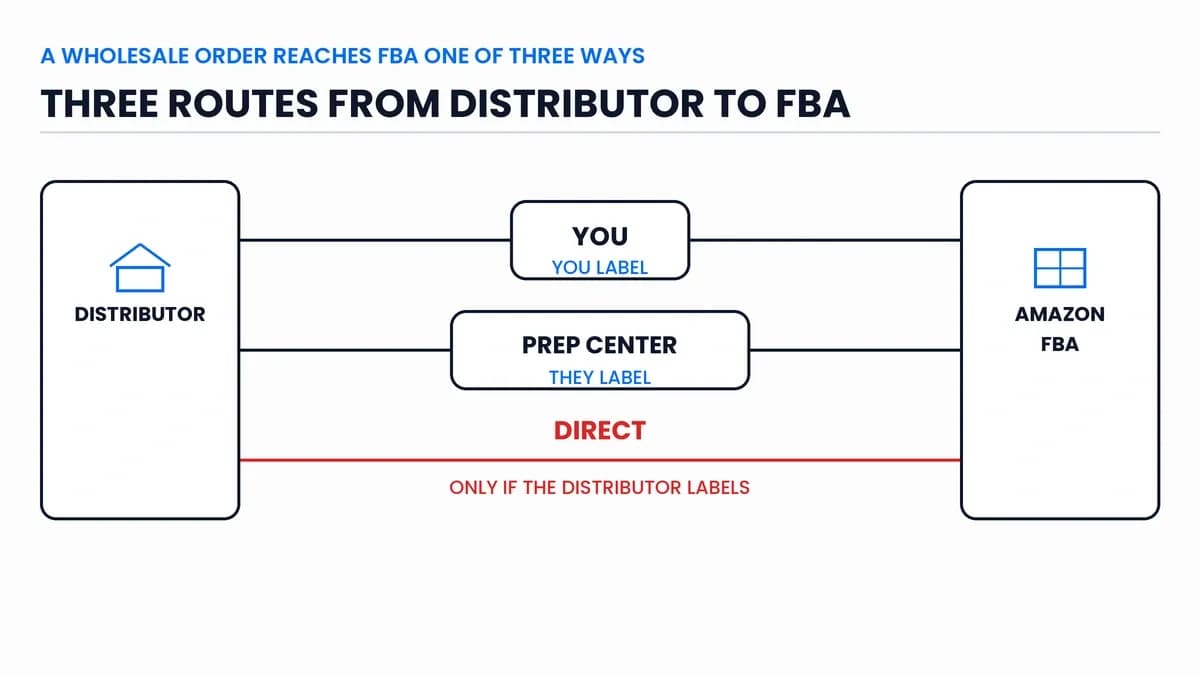
A wholesale order reaches FBA one of three ways. The distributor ships to you, to your prep center, or straight to an Amazon fulfillment center. Direct is fastest, but only if the distributor will put your Amazon labels on the units. So when you work out how to send a wholesale order to FBA, start with one question: who will label it?
A wholesale order starts in a distributor's warehouse, not on your shelf. That changes who does what. So this post starts with the three routes, then walks through the shipment itself.
Why Wholesale Orders Need a Plan Before They Ship
Two changes this year mean every wholesale order needs work before it reaches Amazon.
First, Amazon stopped prepping and labeling for US sellers on January 1, 2026. Its developer notice says the change covers "all inventory that is sent to the US FBA service." An Amazon staff reply on the seller forums is plain about it: "all products must be prepped and labeled before sending them to our facilities."
Second, Amazon ended commingling for inventory shipped on or after March 31, 2026. Resellers who aren't the brand's representative in Brand Registry "will now be required to use Amazon barcode stickers for products even if they have a manufacturer barcode." So a case of branded goods can't go in on its UPC anymore. Each unit first needs your Amazon barcode, called an FNSKU.
That label decides your route, because whoever applies it has to touch every unit. FNSKU Labels on Wholesale Stock: Who Applies Them? covers the label itself.
Route 1: The Distributor Ships to You
The order comes to your home, office or warehouse. You check the count, label the units, pack boxes and create the shipment to Amazon. It's a good place to start. You see the stock with your own eyes, which matters on a first order from a new distributor. You can catch a short count, a damaged case or the wrong variation before Amazon does.
The cost is time and space. Every unit passes through your hands, and a pallet needs somewhere to land. If an order arrives as freight, our post on LTL freight for wholesale orders covers receiving a pallet and what to check before you sign.
Route 2: The Distributor Ships to Your Prep Center
The order goes to a prep center you've hired. They receive it, label it, bag what needs bagging and send it on to Amazon.
That suits you if you don't live near the stock, your orders arrive on pallets, or your hours have run out. You pay per unit. Prep Center vs Doing It Yourself: The Real Cost has the per-unit ranges and a way to work out your break-even.
Send the prep center the order details before it arrives: the purchase order, the expected count per SKU and the tracking number. They use those to match what lands with what you ordered.
Route 3: The Distributor Ships Direct to FBA
The distributor sends the order straight to an Amazon fulfillment center. Nobody else touches it.
It's the fastest route and the cheapest on paper. But it only works if the distributor will do two things. They have to put your FNSKU labels on every unit, and your box labels on every carton. Amazon doesn't stop a supplier from delivering for you. Its LTL requirements post covers "what you, your supplier, or your carrier should do." The shipment is still yours, though. You create it in your Seller Central account, print the labels and send them to the distributor.
Ask your distributor if they'll do this before you build the shipment. Not all will, and it may cost extra. Also ask how they'll confirm the units were labeled, because you won't see the stock before Amazon does. If labels are missing or wrong, you'll hear it from Amazon, not from the distributor.
Route | Who labels | Best when | Watch for |
|---|---|---|---|
To you | You | First orders, small orders | Your time and space |
To a prep center | The prep center | Pallets, distance, volume | Per-unit cost |
Direct to FBA | The distributor | A trusted distributor who'll label | You never see the stock |
Before you pick a route, make sure the product and the distributor are right. You can search a product free and see real cost and real stock from every verified distributor in our network that carries it.
How to Create the Shipment in Send to Amazon
Whichever route you pick, you create the shipment the same way, in Seller Central's Send to Amazon workflow. Amazon's guide to LTL shipments lists the steps:
- From the main menu in Seller Central, select Inventory, then FBA Inventory.
- Select Shipments, then Send to Amazon.
- Choose inventory to send.
- Pack individual units.
- Confirm shipping method and service options.
- Print box labels.
- Select a partner carrier and see rates.
- Print pallet labels.
- Track shipment details.
Steps 7 and 8 only apply to pallet shipments. Three of the other steps need extra care on a wholesale order.
Choose how units are packed
Amazon's step-by-step guide offers two options. Case-pack templates are for "shipping boxes that will contain units with the same SKU." Individual units are for mixed boxes. If your order arrives in sealed cases of one SKU, case packs save you a lot of typing. Our post on case pack, inner pack and master carton explains how to read the pack size on a distributor's catalog.
Who labels
The same guide shows a "Who labels units?" setting. Since January, Amazon isn't a choice there in the US. So it's you, your prep center or your distributor.
Enter box contents
You tell Amazon what's in each box, through a web form or an Excel file upload. Or you can let Amazon process box contents by hand, for a fee.
Small Parcel or Pallet?
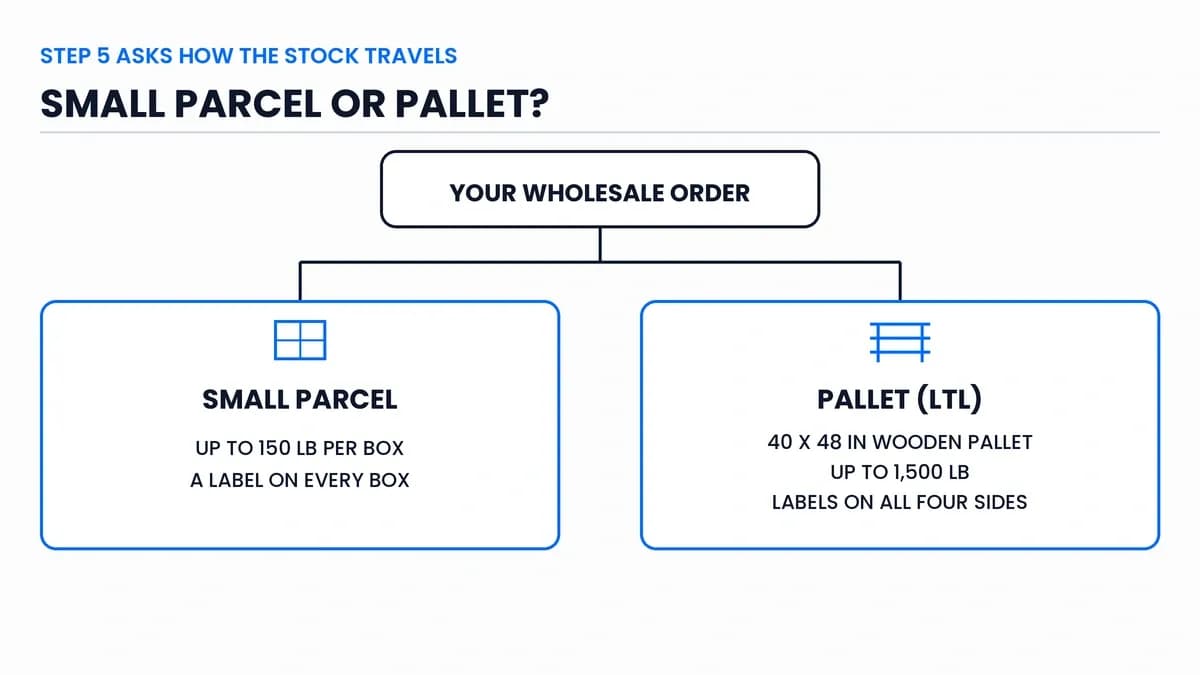
Step 5 asks how the stock travels. Small parcel means individual boxes, each with its own label. Pallets go by LTL, short for less than truckload. Amazon describes that as "sharing truck space with other businesses instead of using an entire truck." Small parcel boxes have a limit of "max 150 lb, 165 inches per package."
If you ship by pallet, the pallet has to meet Amazon's rules. The LTL guide asks for "40 × 48 inches, 4-way access wooden pallets (GMA Standard B Grade or higher)." Pallets must be stretch-wrapped, with "FBA box ID labels facing outward." An Amazon staff post on LTL deliveries adds two more rules. The "total weight of the pallet must not exceed 1,500 lb." And "the units on each pallet must all belong to one shipment ID."
The LTL guide also lists Amazon's partner carriers as a shipping option inside Send to Amazon. Amazon's inbound guide says you can pick a partnered carrier "for discounted rates." You don't have to use one. If your distributor's freight is cheaper, compare the two. Our LTL post covers who should book freight on a wholesale order.
The Inbound Placement Fee: One Location or Several?
When you create a shipping plan, you choose where the stock goes, and each choice has its own cost. That cost is the inbound placement service fee. Amazon announced it in a December 2023 fee update "to reflect our cost of distributing inventory to fulfillment centers close to customers." It took effect on March 1, 2024.
An Amazon staff reply on the seller forums explains the three choices. Minimal splits send everything to as few places as possible, generally one, and Amazon charges a fee to spread it out. Partial splits go to two or three places for a reduced fee. Amazon-optimized splits go to four or more places with no fee, if your plan qualifies. In Amazon's words, you can "send your inventory to multiple inbound locations yourself for a reduced or no fee."
On a wholesale order, you have to weigh both sides. One pallet to one place is simple, but you pay a placement fee. Splitting it means more boxes, more labels and more freight bills. The same reply says you'll "see a fee estimate for each available inbound placement option" when you create a plan. So check it on every order instead of picking the same option out of habit.
Your First Wholesale Shipment: What to Check
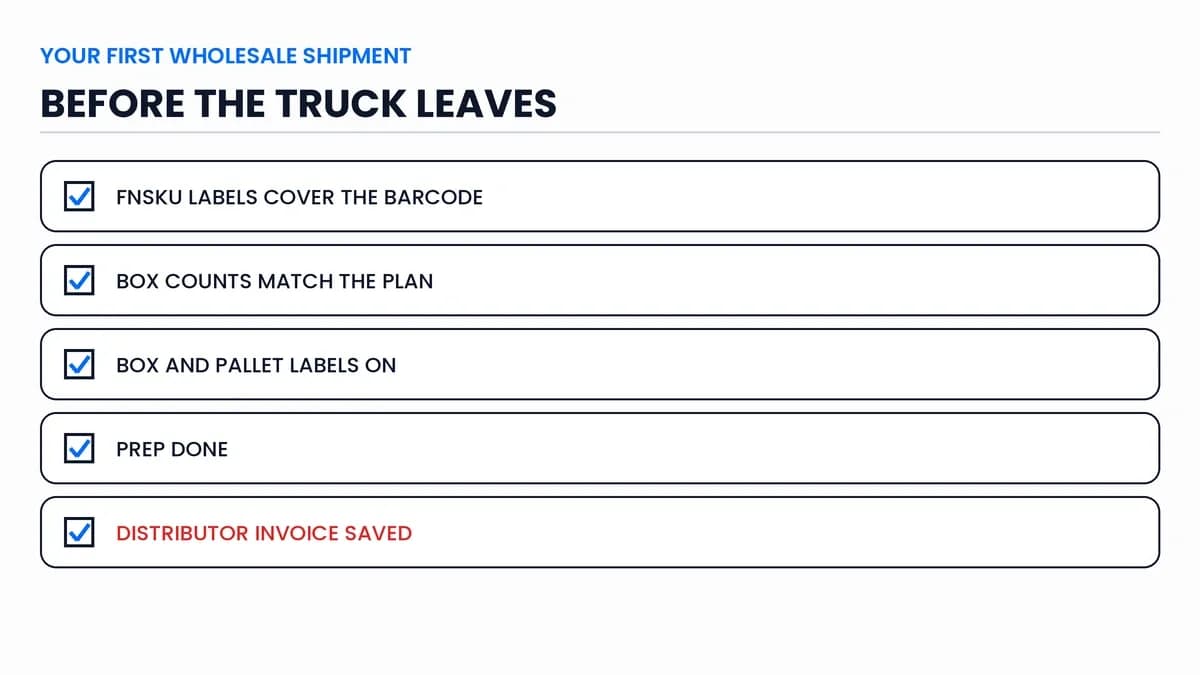
- The units have the right FNSKU labels, covering the manufacturer barcode.
- The counts in each box match what you entered in Send to Amazon.
- Each box has its box label, and each pallet has labels on all four sides.
- The products are prepped the way Amazon's rules ask, such as bagged or bubble-wrapped where needed.
- You've saved the distributor's invoice for the order. If Amazon ever asks where the stock came from, that's your proof.
How to Send a Wholesale Order to FBA: The Takeaways
- A wholesale order reaches FBA through you, a prep center, or direct from the distributor.
- Since March 31, 2026, resellers have to label nearly every unit with an Amazon barcode before it ships. Amazon won't do it for you in the US.
- Direct from the distributor works only if they'll apply your FNSKU and box labels.
- You create every shipment in your own Seller Central account, whoever packs it.
- Use case-pack templates for sealed cases of one SKU.
- Pallets must be 40 by 48 inch wooden, up to 1,500 lb, and labeled on all four sides.
- Check the inbound placement fee estimate on every shipment plan.
Choose the Route Before You Place the Order
Don't wait for the boxes to arrive to pick a route. The distributor needs to know where to ship and whether to label, so the route goes on your purchase order. It also sets your costs, since a prep center or a placement fee becomes part of your landed cost. And it decides how fast the stock goes live.
So when you plan how to send a wholesale order to FBA, settle the route at the same time as the order. If you're still working through the full process, our Amazon wholesale for beginners roadmap puts shipping in context. And if a product you want has no distributor in our network yet, you can Request a Supplier and our team will look for one.
Frequently asked questions
01How can I ship my products to Amazon FBA?
02Can my distributor ship directly to Amazon FBA?
03How do I get wholesale items to sell on Amazon?
The B2B SupplierHub Team
Wholesale & sourcing
Stop hunting suppliers by hand. Type a UPC instead.
B2B Supplier Hub shows the suppliers in our network carrying a product on one page: wholesale cost, stock, and retail price side by side. Free to search, no card required.