
Amazon Ungating
Amazon Rejected Your Invoice: 7 Reasons and Fixes
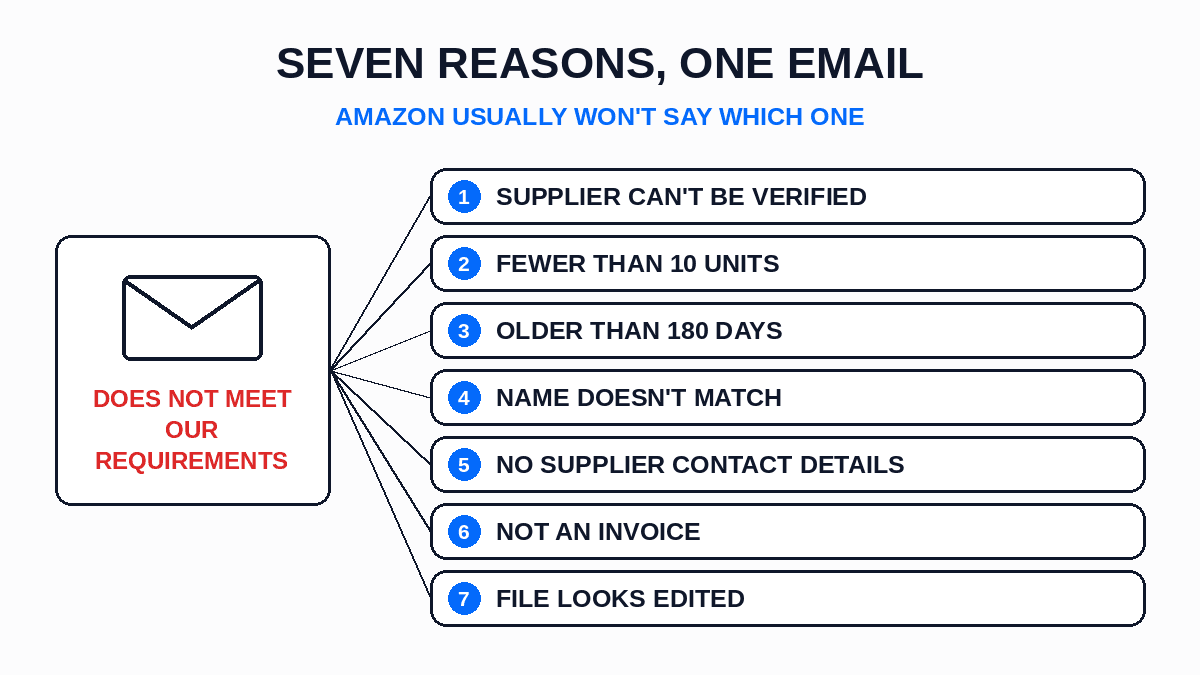
When Amazon rejects an invoice, it's almost always for one of seven reasons:
- The supplier isn't a distributor, so Amazon can't verify them.
- The invoice shows fewer than 10 units.
- The invoice is older than 180 days.
- The name or address on the invoice doesn't match your Seller Central account.
- The supplier's contact details are missing from the invoice.
- You sent a receipt, packing slip, pro forma or order confirmation instead of an invoice.
- The PDF looks edited.
Fixing any of these is easy. Working out which one you've got is the hard part, because Amazon's rejection email usually won't tell you. So this post starts with how to read that email, then goes through each reason with the fix and what to send back. The full list of what a passing invoice needs is in our post on Amazon ungating invoice requirements. This one is only about what to do after the no.
How to Read the Rejection
An Amazon moderator has said on the seller forums that, in general, Amazon "won't share exactly why your documents were not accepted." That's the rule, and most rejection emails follow it. You get a line like "we've reviewed the information you provided and determined that it does not meet our requirements," and nothing else.
Sometimes there's a clue, so read the email twice. Sellers have posted rejections that say "we are unable to verify the transaction with the supplier," or "could not verify supplier," or that the order "has not been fulfilled." Others say a "proforma invoice" was sent and "is not acceptable." Each of those lines points to one of the seven reasons below. If your email has a line like that, start there. If it doesn't, work down the list in order. The first three are the ones to check first.
Some rejection emails also say how long the case stays open. Sellers have posted ones that give 10 business days. That's your window to send a corrected document on the same case.
Reason 1: Amazon Couldn't Verify the Supplier
This is the one behind "unable to verify the transaction with the supplier," and it's the one sellers post about most.
Amazon's reviewers check the supplier on the invoice, not just the invoice itself. Amazon's own selling guidance says invoices should show purchases "from authorized distributors, not retail stores." If the business on your invoice is a retailer, a liquidator or a middleman you can't find online, the reviewer can't confirm where the stock came from. The invoice can be perfect and still fail, because the problem is who it's from.
The fix: Buy the ungating units from a real wholesale distributor, one with a business address, a phone number and a catalog, and reapply with their invoice. Don't resend the old one with a note. If the distributor really is authorized for the brand and Amazon still can't verify them, ask them for a letter confirming the relationship. Our blog post on a brand letter of authorization explains what that letter has to say.
Reason 2: Fewer Than 10 Units
If the supplier checks out, the next thing to look at is the quantity. Amazon's guidance asks for invoices "showing the purchase of 10 or more units." That's 10 or more units of the product or brand you're applying for, shown on the invoice.
This one catches sellers whose 10 units are spread across products that aren't all part of the application. It also catches invoices that show a case count instead of a unit count. "1 x case" of 12 is one line with a quantity of 1, and a reviewer won't work out the unit count for you.
The fix: Ask the distributor to reissue the invoice with each line itemized by product, showing the unit quantity, the product name and the UPC. If the order genuinely had fewer than 10 units, place a second small order and send the new invoice.
Reason 3: The Invoice Is Older Than 180 Days
Date is the third check, and the easiest to miss. Amazon's guidance says invoices should be "dated within 180 days" of the application. An invoice from seven months ago is a rejection, however good it is.
The 180 days run from the invoice date, not the delivery date or the day you paid. You'll still see older forum posts saying 90 days. Amazon's current guidance says 180. Treat that as the outside limit and apply soon after the purchase.
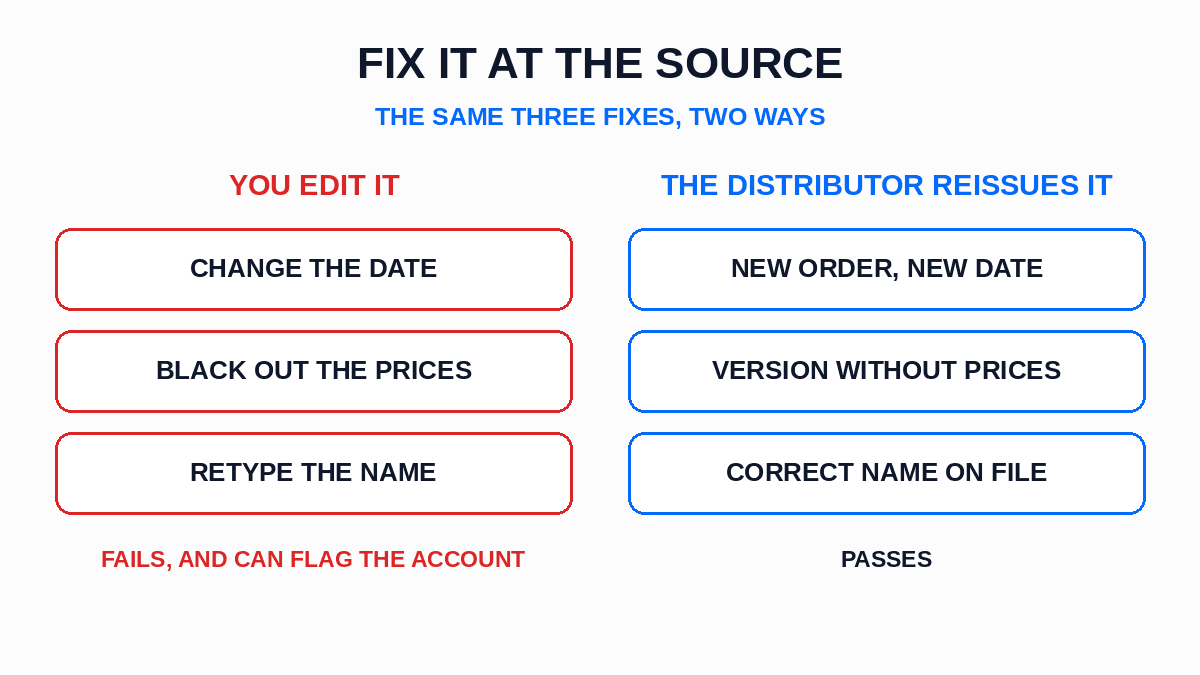
The fix: Place a fresh order with the same distributor and apply with the new invoice. Don't ask the distributor to change the date on the old one. That turns reason 3 into reason 7.
Reason 4: The Name or Address Doesn't Match
Reasons 4 and 5 are both about the words on the page. The name and address on the invoice have to match the name and address on your Seller Central account. Amazon doesn't allow for close.
"Smith Trading" on the invoice and "Smith Trading LLC" in Seller Central is a mismatch. So is a home address on the invoice and a warehouse address in Seller Central. So is a distributor billing your personal name because that's how you signed up with them. None of these look like problems to you. All of them count as a mismatch to Amazon.
The fix: Open Seller Central, copy your legal business name and address exactly, and send them to the distributor's accounts team. Ask them to update your customer record and reissue the invoice. Then resend the reissued invoice on the open case.
Reason 5: The Supplier's Contact Details Are Missing
The same goes for the supplier's side of the invoice. Amazon's reviewer needs to be able to find and contact the supplier. If the invoice shows a supplier name but no address, no phone number and no website, there's nothing to verify against, so it fails for the same reason as reason 1. Sellers often see this as an "invoice verification failed" type of message.
This happens a lot with small distributors whose invoice template was built for their own accounting. The invoice is real, the business is real, and the header still only shows a company name and an email address.
The fix: Ask the distributor to reissue the invoice with their full business name, physical address, phone number and website in the header. Some distributors already have an invoice layout made for Amazon applications. If yours doesn't, the request takes one email. Our post on what a valid wholesale invoice looks like shows where each detail sits.
Reason 6: It Isn't an Invoice
Plenty of rejections are for documents that aren't invoices at all. A receipt from a store. A packing slip from the box. An order confirmation email. A pro forma invoice, which is a quote. A photo of a payment.
Amazon wants a real invoice for an order that has been fulfilled. The rejection wording for this one is often the clearest you'll get. Sellers have posted emails saying the "pro forma invoice" they sent "is not acceptable," or that the order "has not been fulfilled." A pro forma is sent before the order ships, so Amazon treats it as a quote, not proof of purchase.
The fix: Wait until the order has shipped, then ask the distributor for the final invoice. If they only sent a packing slip, the invoice exists in their system, so ask their accounts team rather than your sales rep. And if what you have is a retail receipt, no invoice exists for it. You'll need to buy from a distributor.
Reason 7: The PDF Looks Edited
The last reason is the only one you can cause yourself. Amazon's review checks the file, not just the text on it. A PDF that's been opened in an editor to fix a typo or change a date can show that it was edited. An invoice that looks edited gets treated as if it's fake, and that can affect your account, not just the application.
Amazon does allow pricing to be removed. An Amazon moderator has said on the forums that invoices "may have pricing removed, but the rest of the document must stay visible." Ask the distributor for a copy without prices rather than removing them yourself, so the file arrives as they made it.
The fix: Never edit an invoice. If anything on it is wrong, go back to the distributor and get a reissued copy. Send the original file they give you, uncropped, in whatever format they send it.
Resubmitting: What to Change First
Once you know the reason, resubmitting is simple, but two habits make it worse.
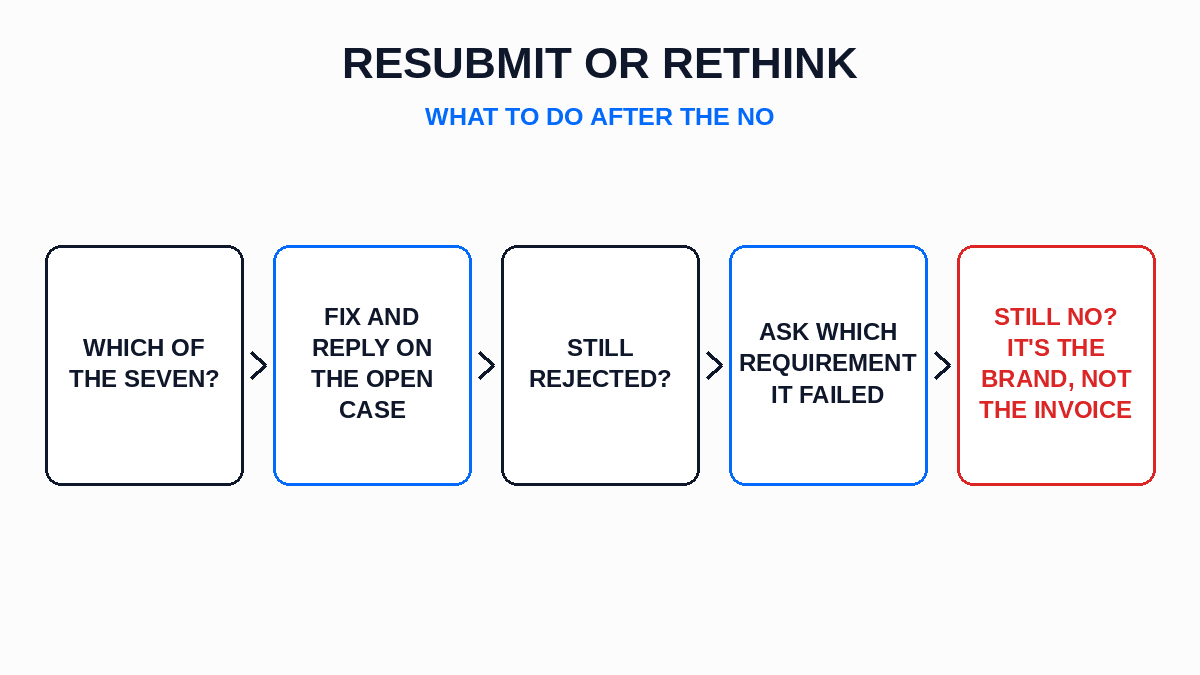
The first is sending the same document again. If nothing on it has changed, the answer won't change either. Every resubmission should carry something different: a reissued invoice, a new order, a letter from the brand.
The second is opening a new case every time instead of replying on the open one. The rejection email gives you a window to reply with corrected documents. Use it. A reply on the same case keeps the history together, so a reviewer can see what changed.
If you've checked all seven and a clean invoice from a known distributor is still rejected, reply on the case and ask Seller Support to tell you which requirement the invoice failed. Say which one you think is being misread, and attach the invoice again. You may not get a reason, but a clear question gets you further than another copy of the same file. Our blog on how to get ungated on Amazon covers what a clean application looks like before you ever reach this step.
When It's Not the Invoice at All
Sometimes none of the seven apply, the invoice is perfect, and the answer is still no. That usually means one of two things.
The first is a brand gate. Some brands keep a list of approved sellers, and if you're not on it, no invoice opens the gate. An Amazon moderator on the forums laid out the route: the brand has to add you as an authorized third-party reseller through Brand Registry, and then you contact Selling Partner Support. Your distributor can't do that for you, because only the brand can add names to that list. Our post on how to check if a brand is gated on Amazon shows how to spot this before you buy stock.
The second is that the invoice wasn't for ungating at all. If Amazon asked for it because of an inauthentic complaint on a live listing, the standard is stricter and a rejection can take the listing down. That's a separate process, covered in our post on Amazon Section 3 inauthentic complaints.
Start the Next Application With the Right Distributor
Most of the seven reasons trace back to the supplier: who they are, what their invoice shows, whether they'll reissue it, whether they itemize units. So the fix that lasts is the distributor you buy the next one from. You can search a product free and see real cost and real stock from every verified distributor in our network carrying it, and the brands directory shows which verified distributors carry a brand before you apply for it. If the product isn't in the network yet, you can ask our team to find an authorized wholesale distributor for it, free on every plan, with an answer within 30 days either way.
Amazon Invoice Rejected: The Takeaways
- Amazon usually won't say why. Read the email twice for a clue, then work down the seven reasons in order.
- Check reasons 1, 2 and 3 (supplier, units, date) first.
- Every fix is the same move: get the distributor to reissue, or place a new order. Never edit the file yourself.
- Reply on the open case with something new. Don't resend the same document, and don't open a new case each time.
- If a clean invoice keeps failing, reply on the case and ask Seller Support which requirement it missed.
- If nothing works, it's the brand, not the invoice. Only the brand can add you through Brand Registry.
- An invoice rejected on an inauthentic complaint is a different problem. Don't handle it like ungating.
The Invoice Is Fixable. Pick the Reason First.
A rejected invoice feels final because the email gives you nothing to work with. It isn't final. Seven reasons cover most rejections, and every one has a fix you can do this week with a distributor who'll reissue a document.
So don't send anything else until you know which reason hit you. Then fix that one thing, reply on the open case, and buy the next ungating units from a distributor whose invoice won't need fixing at all.
This is general information based on Amazon's published guidance and public seller forum posts, not legal advice. Amazon's rules change often, so check Seller Central for the current requirements.
Frequently asked questions
01What are common reasons for invoice rejection?
02Why do I keep getting rejected by Amazon?
03What is a rejected invoice?
04Can I resubmit the same invoice to Amazon?
The B2B SupplierHub Team
Wholesale & sourcing
Stop hunting suppliers by hand. Type a UPC instead.
B2B Supplier Hub shows the suppliers in our network carrying a product on one page: wholesale cost, stock, and retail price side by side. Free to search, no card required.